Model Features
LTE Stack
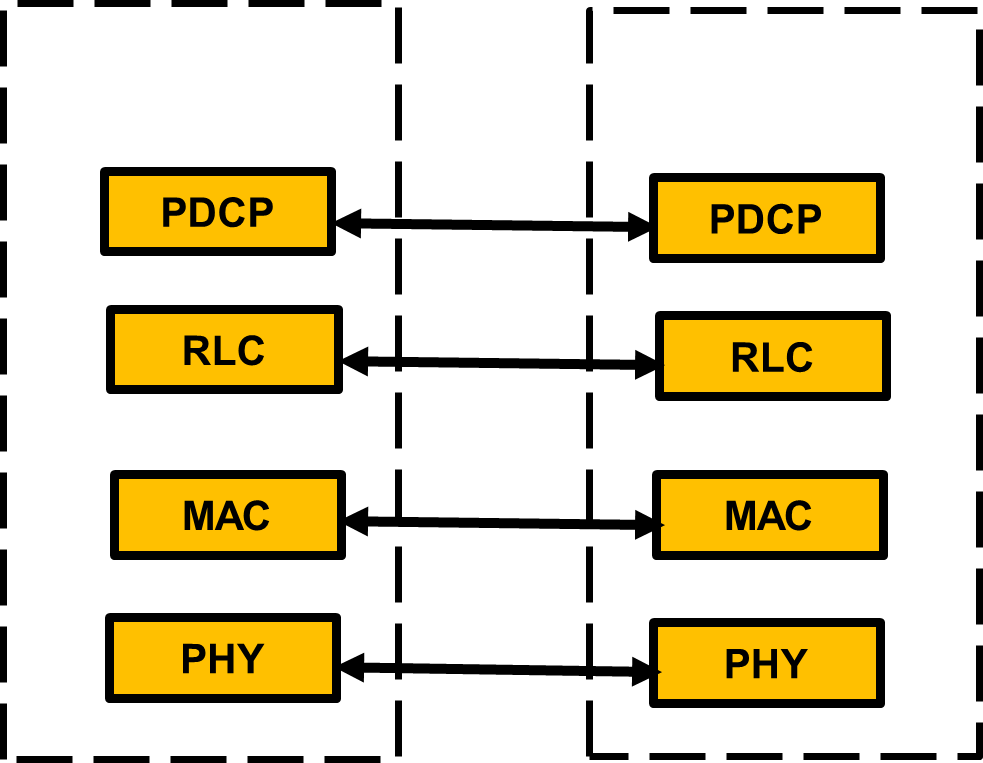
UE eNB
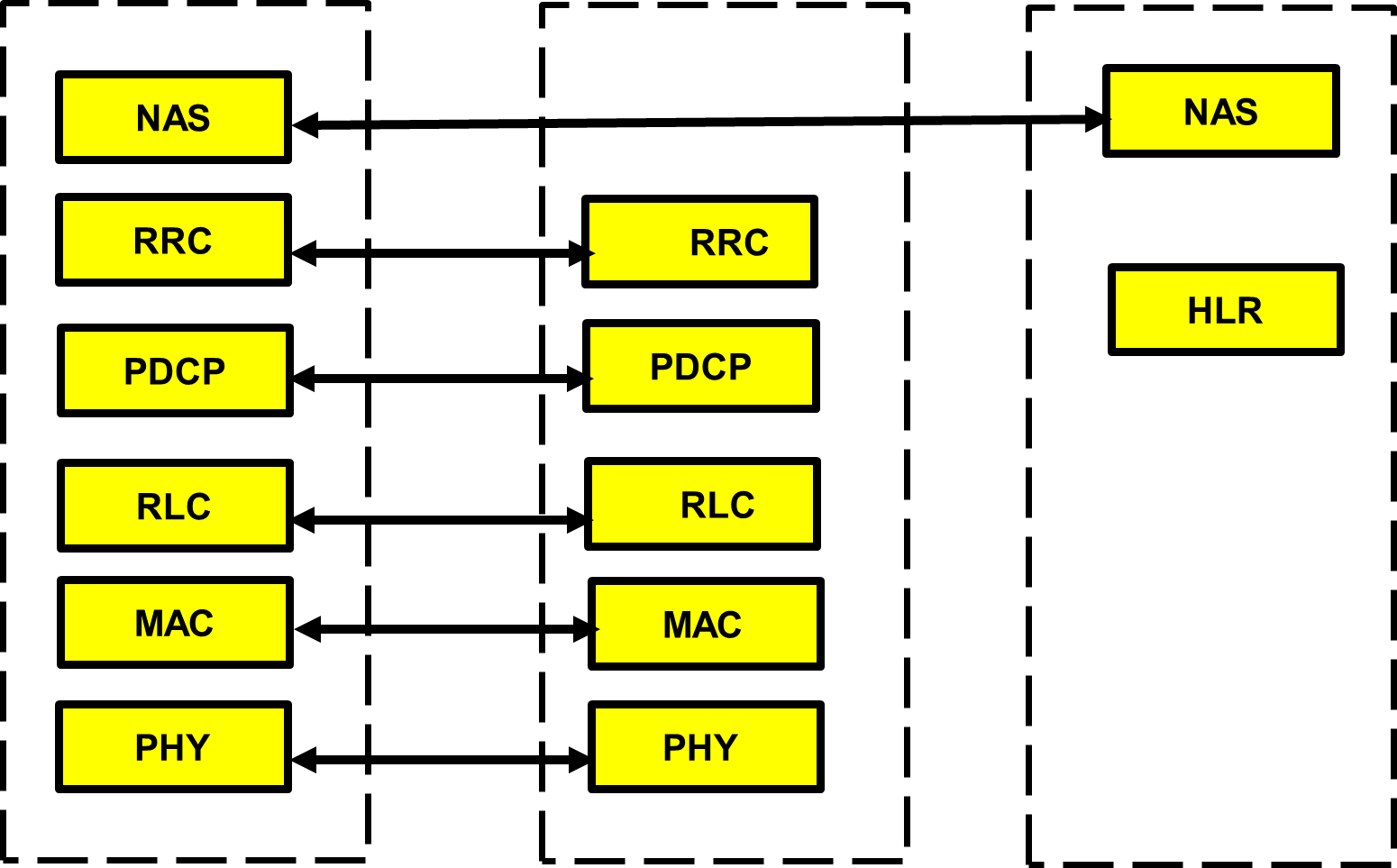
UE eNB EPC (PGW&SGW)
RRC
The Radio Resource Control (RRC) protocol is used in the air interface. The major functions of the RRC protocol include connection establishment and release functions, broadcast of system information, radio bearer establishment, reconfiguration, and release, RRC connection mobility procedures, paging notification and release and outer loop power control. By means of the signaling functions, the RRC configures the user and control planes according to the network status and allows for Radio Resource Management strategies to be implemented. In NetSim’s RRC protocol includes the functionality related to connection establishment, broadcast of system information, radio bearer establishment, reconfiguration, RRC connection mobility procedures, paging notification.
The RRC code is available in the following C files, LTENR_RRC.c, LTENR_GNBRRC.c, and LTENR_NAS.c (RRC connection mobility and Handover procedures).
A UE can move to RRC Idle mode from RRC connected/RRC Active or RRC Inactive state.
System information acquisition
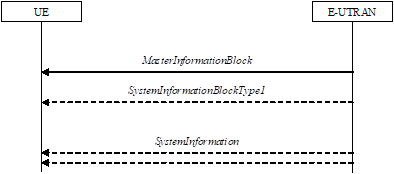
The system information is divided into the Master Information Block (MIB) and System Information Block 1.
Master Information Block (MIB)
The Master Information Block (MIB) is broadcast information transmitted periodically by the eNodeB. UE has the information about the Physical cell ID and enable it to decode the further information which Master Information Block, which will provides the system bandwidth, system frame number etc.
The UE needs to first decode MIB in order for it to receive other system information. MIB is transmitted on the DL-SCH (Logical Channel: BCCH) with a periodicity of 80 ms and variable transmission repetition periodicity within 40 ms.
Bits and Bytes of Master information blocks:
Logical Channel – BCCH (Broadcast common control Channel)
Transport Channel – BCH (Broadcast Channel)
Physical Channel – PBCH (Physical Broadcast channel)
RLC Mode – (Transparent Mode)
System Information Block 1 (SIB1)
SIB carries the most critical information required for the UE to access the cell e.g., random access parameters.
SIB1 includes information regarding the availability and scheduling of other SIBs e.g. mapping of SIBs to SI messages, periodicity, SI-window size, etc.
SIB1 also indicates whether one or more SIBs are only provided on-demand, in which case, it may also provide PRACH configuration needed by the UE to request for the required SI.
SIB1 also contains radio resource configuration information that is common for all UEs and cell barring information applied to the unified access control. SIB1 is transmitted on the DL-SCH (logical channel: BCCH) with a periodicity of 80 ms and variable transmission repetition periodicity within 80 ms. SIB1 is a cell-specific SIB.
Logical Channel – BCCH (Broadcast Common Control Channel)
Transport Channel – BCH (Broadcast Channel)
Physical Channel – PBCH (Physical Broadcast channel)
RLC Mode – (Transparent Mode)
RRC connection establishment
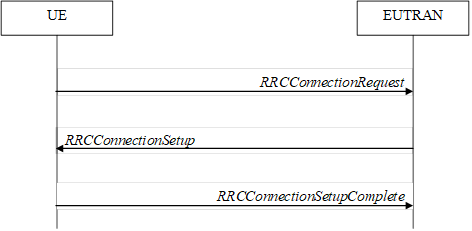
RRC connection establishment starts with UE sends the RRC connection request to EUTRAN (eNB). RRC connection setup as a response sends back from the EUTRAN to UE. The UE sends back the RRC connection setup complete and the RRC connection is established between UE and EUTRAN (eNB).
PDCP
The PDCP layer receives a packet (data/control) from the upper layer, executes its functions and transmits the packet to the lower layer. PDCP layer code related files LTENR_PDCP.c. PDCP Entity: The PDCP entities are located in the PDCP sublayer. NetSim implements one PDCP entity per UE by default, (though users can add more by modifying the code). The same PDCP entity is associated with both the control and the user plane.
The PDCP functionality supported is:
Transmit PDCP SDU – It transmits the data between RLC and higher U-Plane interface
Sets the PDCP Sequence Number.
Adds an RLC Header.
Calls RLC service primitive.
ROHC (Robust Header Compression)
ROHC is an algorithm to compress the header of various IP packets. In case of IPv4, the size of uncompressed IP header is 40 bytes.
PDCP Association
This call back function is invoked when the UE associates/dissociates from a eNB.
Maintenance of PDCP sequence numbers (to know more check the PDCP entity structure)
Discard Timer:
When the discardTimer expires for a PDCP SDU, or the successful delivery of a PDCP SDU is confirmed by PDCP status report, the transmitting PDCP entity shall discard the PDCP SDU along with the corresponding PDCP Data PDU.
Discarding a PDCP SDU already associated with a PDCP SN causes a SN gap in the transmitted PDCP Data PDUs, which increases PDCP reordering delay in the receiving PDCP entity.
Duplicate Discard:
PDCP maintain the sequence number, if the PDCP receives a duplicate sequence number, it discards the PDCP SDU along with the corresponding PDCP Data PDU.
RLC
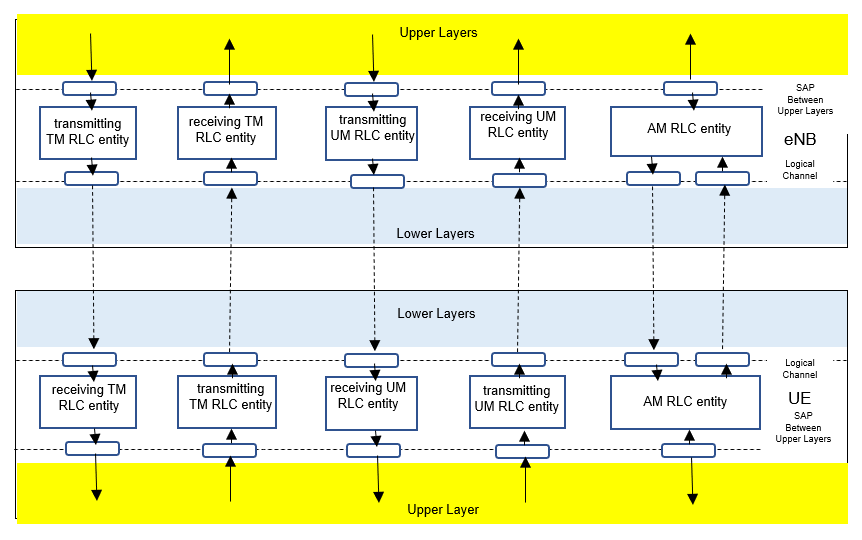
Flow of TM, UM, and AM mode between RLC upper and lower layer as shown in the figure below.
TM Mode (Transparent Mode)
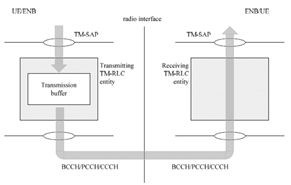
The operation being done in TM mode is a buffering operation. It keeps the input data for a certain amount of time or until next input data comes in, it just discard it if it is not get transmitted within a certain time frame.
As you see in the figure, BCCH, PCCH, CCCH go through this type of RLC process. In WCDMA, Voice call traffic used this RLC mode as well. This means that certain types of DTCH (voice traffic) uses this mode in WCDMA. However it is technically possible to use TM mode for DTCH as well. RLC TM mode code related file LTENR_RLC.c.
UM Mode (Unacknowledged Mode)
The following operation done in RLC UM transmission and reception.
RLC UM Data Flow (Transmission):
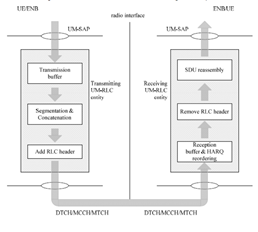
During the RLC UM transmission, it receives the SDU (Data) from the higher layers (PDCP or RRC) and puts the SDU into the transmission buffer. When the MAC permits the transmission, it segments or concatenates the SDU into RLC PDU and add the RLC header to the RLC PDU. Then the RLC SDU is then sent to the next layer (MAC layer).
RLC UM Data Flow (Reception):
The MAC layer passes the received RLC PDU to the RLC layer. RLC layer removes RLC header from the RLC PDU, then the RLC layer assembles PDUs into the upper layer SDU and it passes the assembled SDUs to the higher layers (PDCP or RRC).
As you see in the figure, DTCH, MTCH, MCCH use this type of RLC process. Again, this is also a matter of choice. You can use AM or UM mode for DTCH. RLC UM mode code related file LTENR_RLC_UM.c.
AM Mode (Acknowledge Mode)
The following operation done in RLC AM transmission and reception.
RLC AM Data Flow (Transmission):
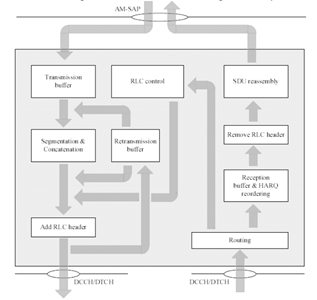
At the time of RLC AM transmission, It receives the SDU (Data) from the higher layers (PDCP or RRC) and put the SDU into the transmission buffer. When the MAC permits the transmission, it segment or concatenate the SDU into RLC PDU and add the RLC header to the RLC PDU and make the copy of the transmission buffer for the possible retransmission. Then the RLC SDU sent to the next layer (MAC layer).
RLC AM Data Flow (Reception):
The MAC layer passes the received RLC PDU to the RLC layer. RLC layer removes RLC header from the RLC PDU. If the received RLC PDU does not have any problem, mark it as positive ACK. Then the RLC layer assemble PDUs into the upper layer SDU and it passes the assembled SDUs to the higher layers (PDCP or RRC). RLC AM mode code related file LTENR_RLC_AM.c.
MAC Scheduler
At each eNB, the MAC Scheduler determines the PRB allocation for each carrier in a slot. The MAC schedulers work as follows:
Round Robin – It divides the available PRBs among active flows, i.e., logical channels with non-empty RLC queues. The MCS for each user is determined based on the received CQIs.
Proportional fair – It allocates PRBs in proportion to the channel quality of active flows.
Max throughput – It allocates PRBs to the active flow(s) to maximize achievable throughput.
Note that these are MAC scheduling algorithms, and they aren’t based on the QoS set in the Application.
PHY Layer
Physical Speed of the LTE Air Interface
One Resource Block (RB) in LTE has 12 carriers (each carrier is 15 kHz) in frequency domain and 0.5 milliseconds (7 symbols) in time domain.
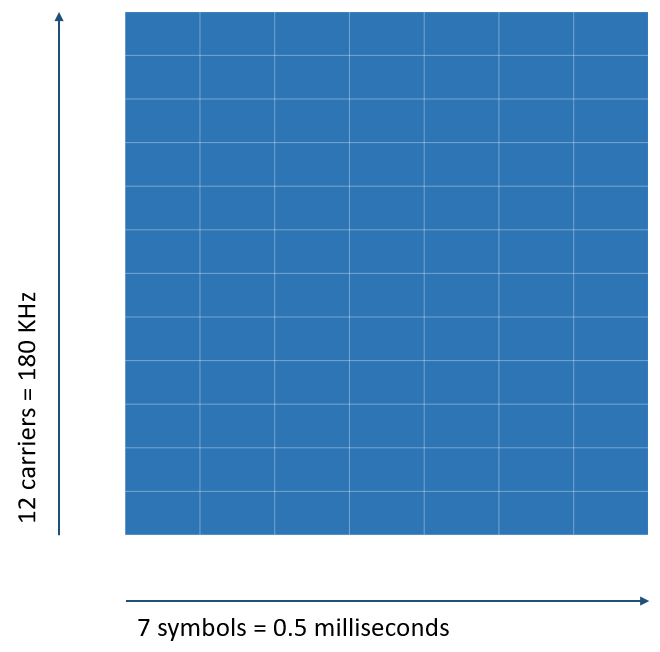
\[\text{So, the total number of symbols in a Resource block} = 12 \times 7 = 84\]
A symbol accommodates a specific number of bits depending on the modulation scheme. The following table lists the number of bits for different modulation schemes.
| Modulation scheme | Number of bits per symbol |
|---|---|
| QPSK | 2 |
| 16-QAM | 4 |
| 64-QAM | 6 |
The following table lists the number of Resource blocks, carriers, and the bandwidth available for different LTE channel bandwidths.
| Channel bandwidth (MHz) | 5 | 10 | 15 | 20 |
|---|---|---|---|---|
| Resource blocks | 25 | 50 | 75 | 100 |
| Number of carriers | 300 | 600 | 900 | 1200 |
| Occupied bandwidth (MHz) | 4.5 | 9 | 13.5 | 18 |
Note: In an LTE network, 10% of total bandwidth is used for the guard band. For example, if the channel bandwidth is 20 MHz, then 2 MHz is used for the guard band. So, if 180 KHz has 1 RB, 18 MHz has 100 RBs.
LTE and LTE-A Operating Bands
The following table lists the details of the LTE and LTE-A frequency bands defined by 3GPP. NetSim uses these bands to simulate LTE-A networks.
Note: NetSim supports both TDD and FDD.
| LTE band # | Uplink (MHz) | Downlink (MHz) | Width (MHz) | Duplex spacing (MHz) | Band gap (MHz) |
|---|---|---|---|---|---|
| 1 | 1920 – 1980 | 2110 – 2170 | 60 | 190 | 130 |
| 2 | 1850 – 1910 | 1930 – 1990 | 60 | 80 | 20 |
| 3 | 1710 – 1785 | 1805 – 1880 | 75 | 95 | 20 |
| 4 | 1710 – 1755 | 2110 – 2155 | 45 | 400 | 355 |
| 5 | 824 – 849 | 869 – 894 | 25 | 45 | 20 |
| 7 | 2500 – 2570 | 2620 – 2690 | 70 | 120 | 50 |
| 8 | 880 – 915 | 925 – 960 | 35 | 45 | 10 |
| 11 | 1427.9 – 1447.9 | 1475.9 – 1495.9 | 20 | 48 | 28 |
| 12 | 699 – 716 | 729 – 746 | 18 | 30 | 12 |
| 13 | 777 – 787 | 746 – 756 | 10 | \(-31\) | 41 |
| 17 | 704 – 716 | 734 – 746 | 12 | 30 | 18 |
| 18 | 815 – 830 | 860 – 875 | 15 | 45 | 30 |
| 19 | 830 – 845 | 875 – 890 | 15 | 45 | 30 |
| 20 | 832 – 862 | 791 – 821 | 30 | \(-41\) | 71 |
| 21 | 1447.9 – 1462.9 | 1495.9 – 1510.9 | 15 | 48 | 33 |
| 23 | 2000 – 2020 | 2180 – 2200 | 20 | 180 | 160 |
| 25 | 1850 – 1915 | 1930 – 1995 | 65 | 80 | 15 |
| 26 | 814 – 849 | 859 – 894 | 30 | 40 | 10 |
| 27 | 807 – 824 | 852 – 869 | 17 | 45 | 28 |
| 28 | 703 – 748 | 758 – 803 | 45 | 55 | 10 |
LTE Single Bands
The following list of specified frequency bands of LTE single bands are referred from 3GPP 36101-h60.
| E-UTRA Band | Uplink (UL) | Downlink (DL) | Duplex | ||||
|---|---|---|---|---|---|---|---|
| \(F_{UL,low}\) | \(F_{UL,high}\) | \(F_{DL,low}\) | \(F_{DL,high}\) | ||||
| 1 | 1920 MHz | – | 1980 MHz | 2110 MHz | – | 2170 MHz | FDD |
| 2 | 1850 MHz | – | 1910 MHz | 1930 MHz | – | 1990 MHz | FDD |
| 3 | 1710 MHz | – | 1785 MHz | 1805 MHz | – | 1880 MHz | FDD |
| 4 | 1710 MHz | – | 1755 MHz | 2110 MHz | – | 2155 MHz | FDD |
| 5 | 824 MHz | – | 849 MHz | 869 MHz | – | 894 MHz | FDD |
| 6 | 830 MHz | – | 840 MHz | 875 MHz | – | 885 MHz | FDD |
| 7 | 2500 MHz | – | 2570 MHz | 2620 MHz | – | 2690 MHz | FDD |
| 8 | 880 MHz | – | 915 MHz | 925 MHz | – | 960 MHz | FDD |
| 9 | 1749.9 MHz | – | 1784.9 MHz | 1844.9 MHz | – | 1879.9 MHz | FDD |
| 10 | 1710 MHz | – | 1770 MHz | 2110 MHz | – | 2170 MHz | FDD |
| 11 | 1427.9 MHz | – | 1447.9 MHz | 1475.9 MHz | – | 1495.9 MHz | FDD |
| 12 | 699 MHz | – | 716 MHz | 729 MHz | – | 746 MHz | FDD |
| 13 | 777 MHz | – | 787 MHz | 746 MHz | – | 756 MHz | FDD |
| 14 | 788 MHz | – | 798 MHz | 758 MHz | – | 768 MHz | FDD |
| 17 | 704 MHz | – | 716 MHz | 734 MHz | – | 746 MHz | FDD |
| 18 | 815 MHz | – | 830 MHz | 860 MHz | – | 875 MHz | FDD |
| 19 | 830 MHz | – | 845 MHz | 875 MHz | – | 890 MHz | FDD |
| 20 | 832 MHz | – | 862 MHz | 791 MHz | – | 821 MHz | FDD |
| 21 | 1447.9 MHz | – | 1462.9 MHz | 1495.9 MHz | – | 1510.9 MHz | FDD |
| 22 | 3410 MHz | – | 3490 MHz | 3510 MHz | – | 3590 MHz | FDD |
| 23 | 2000 MHz | – | 2020 MHz | 2180 MHz | – | 2200 MHz | FDD |
| 24 | 1626.5 MHz | – | 1660.5 MHz | 1525 MHz | – | 1559 MHz | FDD |
| 25 | 1850 MHz | – | 1915 MHz | 1930 MHz | – | 1995 MHz | FDD |
| 26 | 814 MHz | – | 849 MHz | 859 MHz | – | 894 MHz | FDD |
| 27 | 807 MHz | – | 824 MHz | 852 MHz | – | 869 MHz | FDD |
| 28 | 703 MHz | – | 748 MHz | 758 MHz | – | 803 MHz | FDD |
| 30 | 2305 MHz | – | 2315 MHz | 2350 MHz | – | 2360 MHz | FDD |
| 31 | 452.5 MHz | – | 457.5 MHz | 462.5 MHz | – | 467.5 MHz | FDD |
| 33 | 1900 MHz | – | 1920 MHz | 1900 MHz | – | 1920 MHz | TDD |
| 34 | 2010 MHz | – | 2025 MHz | 2010 MHz | – | 2025 MHz | TDD |
| 35 | 1850 MHz | – | 1910 MHz | 1850 MHz | – | 1910 MHz | TDD |
| 36 | 1930 MHz | – | 1990 MHz | 1930 MHz | – | 1990 MHz | TDD |
| 37 | 1910 MHz | – | 1930 MHz | 1910 MHz | – | 1930 MHz | TDD |
| 38 | 2570 MHz | – | 2620 MHz | 2570 MHz | – | 2620 MHz | TDD |
| 39 | 1880 MHz | – | 1920 MHz | 1880 MHz | – | 1920 MHz | TDD |
| 40 | 2300 MHz | – | 2400 MHz | 2300 MHz | – | 2400 MHz | TDD |
| 41 | 2496 MHz | – | 2690 MHz | 2496 MHz | – | 2690 MHz | TDD |
| 42 | 3400 MHz | – | 3600 MHz | 3400 MHz | – | 3600 MHz | TDD |
| 43 | 3600 MHz | – | 3800 MHz | 3600 MHz | – | 3800 MHz | TDD |
| 44 | 703 MHz | – | 803 MHz | 703 MHz | – | 803 MHz | TDD |
| 45 | 1447 MHz | – | 1467 MHz | 1447 MHz | – | 1467 MHz | TDD |
| 46 | 5150 MHz | – | 5925 MHz | 5150 MHz | – | 5925 MHz | TDD8 |
| 47 | 5855 MHz | – | 5925 MHz | 5855 MHz | – | 5925 MHz | TDD11 |
| 48 | 3550 MHz | – | 3700 MHz | 3550 MHz | – | 3700 MHz | TDD |
| 49 | 3550 MHz | – | 3700 MHz | 3550 MHz | – | 3700 MHz | TDD16 |
| 50 | 1432 MHz | – | 1517 MHz | 1432 MHz | – | 1517 MHz | TDD13 |
| 51 | 1427 MHz | – | 1432 MHz | 1427 MHz | – | 1432 MHz | TDD13 |
| 52 | 3300 MHz | – | 3400 MHz | 3300 MHz | – | 3400 MHz | TDD |
| 53 | 2483.5 MHz | – | 2495 MHz | 2483.5 MHz | – | 2495 MHz | TDD |
| 65 | 1920 MHz | – | 2010 MHz | 2110 MHz | – | 2200 MHz | FDD |
| 66 | 1710 MHz | – | 1780 MHz | 2110 MHz | – | 2200 MHz | FDD4 |
| 68 | 698 MHz | – | 728 MHz | 753 MHz | – | 783 MHz | FDD |
| 70 | 1695 MHz | – | 1710 MHz | 1995 MHz | – | 2020 MHz | FDD10 |
| 71 | 663 MHz | – | 698 MHz | 617 MHz | – | 652 MHz | FDD |
| 72 | 451 MHz | – | 456 MHz | 461 MHz | – | 466 MHz | FDD |
| 73 | 450 MHz | – | 455 MHz | 460 MHz | – | 465 MHz | FDD |
| 74 | 1427 MHz | – | 1470 MHz | 1475 MHz | – | 1518 MHz | FDD |
| 85 | 698 MHz | – | 716 MHz | 728 MHz | – | 746 MHz | FDD |
| 87 | 410 MHz | – | 415 MHz | 420 MHz | – | 425 MHz | FDD |
| 88 | 412 MHz | – | 417 MHz | 422 MHz | – | 427 MHz | FDD |
| 103 | 787 MHz | – | 788 MHz | 757 MHz | – | 758 MHz | FDD |
LTE and LTE-A Transmission Modes
NetSim supports the following LTE Transmission modes:
Transmission Mode 1 – SISO, using a single antenna at the eNodeB. Because of Round-robin scheduling, all applications see equal throughput.
Transmission Mode 2 – MIMO and Transmit Diversity (TxD). Sends copies of the same information via multiple antennas. This leads to higher reliability, but the throughput remains the same as Mode 1.
Transmission Mode 3, SU – MIMO Spatial Multiplexing, Open Loop. This is used to achieve high data rates. The data is divided and sent via various antennas. The throughput increases.
Transmission Mode 4, MU-MIMO Spatial Multiplexing, as per the LTE standard. With a multi-user setup, multiple antennas are used to send and receive data. The data throughput further increases.
Transmission mode 5 – MU-MIMO, where the number of receive antennas is fixed at 2.
LTE and LTE-A PHY Layer Parameters
The following table lists the details of the parameters of the PHY layer in LTE.
| Channel bandwidth (MHz) | 1.4 | 3 | 5 | 10 | 15 | 20 |
|---|---|---|---|---|---|---|
| Number of Resource blocks (\(N_{RB}\)) | 6 | 15 | 25 | 50 | 75 | 100 |
| Number of occupied carriers | 73 | 181 | 301 | 601 | 901 | 1201 |
| IFFT(Tx) / FFT size (Rx) | 128 | 256 | 512 | 1024 | 1536 | 2048 |
| Sampling frequency (MHz) | 1.92 | 3.84 | 7.68 | 15.36 | 23.04 | 30.72 |
| Samples per slot | 960 | 1920 | 3840 | 7680 | 11520 | 15360 |
| Guard Band | 160 | 150 | 250 | 500 | 750 | 1000 |
IFFT = Inverse Fast Fourier Transform and FFT = Fast Fourier Transform
HARQ
Introduction
We start with a brief and simplistic explanation of the HARQ mechanism.
Hybrid Automatic Repeat Request (Hybrid ARQ or HARQ) is a combination of retransmissions and error correction. The HARQ protocol runs in the MAC and PHY layers.
In the 5G PHY, a code block group (CBG) is transmitted over the air by the transmitter to the receiver. If the CBG is successfully received the receiver sends back an ACK, otherwise, if the CBG is received in error, the receiver sends back a NACK (Negative ACK).
If the transmitter receives an ACK, it sends the next CBG. However, if the transmitter receives a NACK, it retransmits the previously transmitted CBG.
In 5G/LTE, the incorrectly received CBG is not discarded but stored at the receiver. When the re-transmitted CBG is received, the two CBGs are combined. This is called Hybrid ARQ with Chase Combining (HARQ-CC).
Implementation in NetSim
HARQ is implemented in 4G (Macro Cell eNB) and in 5G (Macro Cell gNB) in both downlink and uplink.
A HARQ entity is defined for each eNB-UE pair, separately for Uplink and Downlink and for each component carrier. The HARQ entity handles the HARQ processes.
The maximum number of HARQ processes is 8 in 4G.
The maximum number of HARQ processes is 16 in 5G.
Each HARQ process transmits one Transport Block (TB) at any time.
When operating in MIMO, each layer handles a different TB. This means that one TB is not transmitted across multiple layers.
Each TB is split into Code blocks (CBs) and Code Blocks (CBs) are grouped into Code Block Groups (CBGs).
At the receiver the CBGs are given to a multiplexer which combines the CBGs into a TB.
CBGs are always retransmitted at the same MCS as the first transmission. This restriction comes from the specification of the rate matcher in the 3GPP TS 38.212 standard.
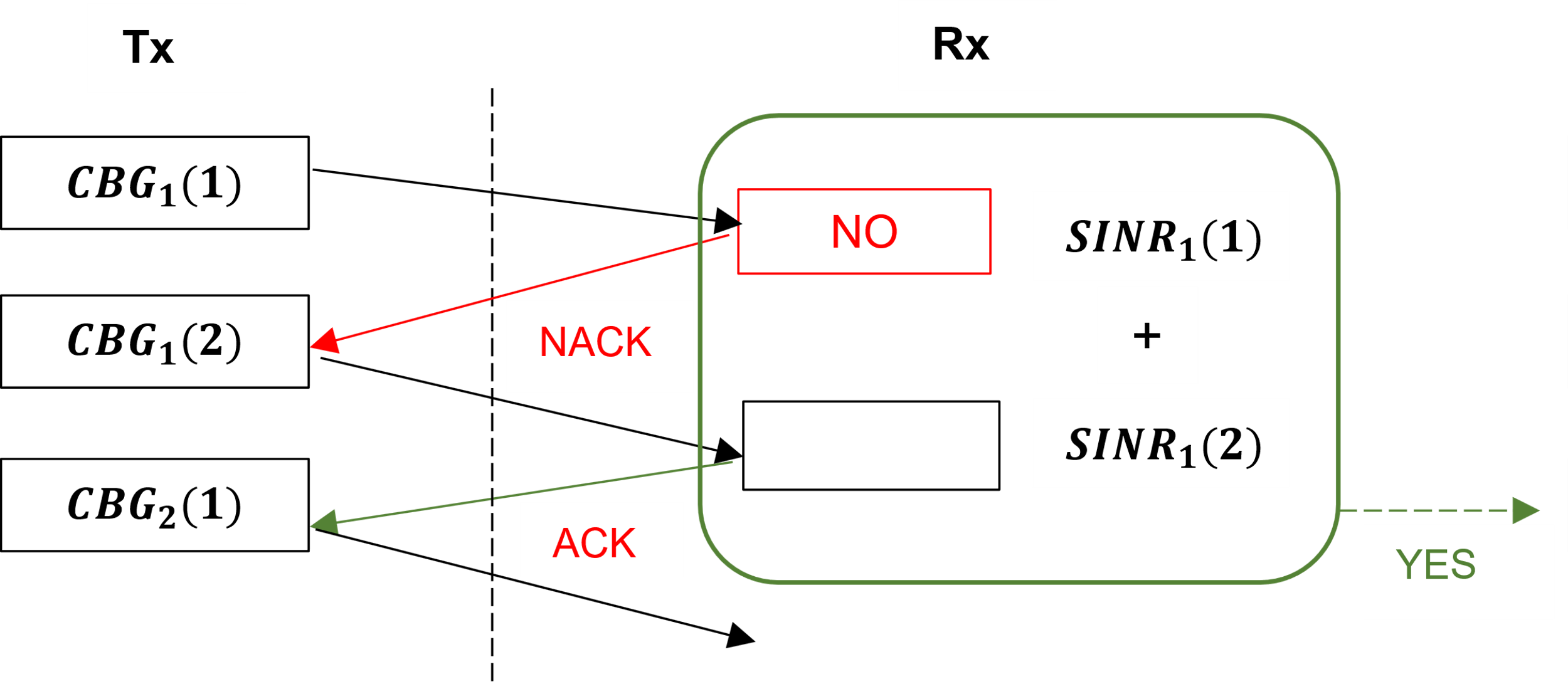
In HARQ-CC, every retransmission contains the same coded bits (information and coding bits). We abstract soft combining and model it by summing (in linear scale) the SINRs of transmitted and retransmitted CBGs. The BLER is then looked up for the combined SINR.
The New Data Indicator NDI flag is set to true (both in UL and DL) true for transmission of a new TB.
HARQ entity is terminated during handover-triggered de-association from a eNB and re-created at the new eNB after the handover procedure is completed.
HARQ retransmissions have priority over new data transmissions. Within a HARQ process, new data transmissions are not taken up when retransmission data is in the queue.
HARQ processes are multiplexed in time (slots) in a round robin fashion. For example, if we had a case with 4 HARQ processes then:
Slot 1 – HARQ Process 1 \(>\) Success
Slot 2 – HARQ Process 2 \(>\) Success
Slot 3 – HARQ Process 3 \(>\) Error
Slot 4 – HARQ Process 4 \(>\) Success
Slot 5 – HARQ Process 1 \(>\) Success
Slot 6 – HARQ Process 2 \(>\) Success
Slot 7 – HARQ Process 3 \(>\) Retransmission Success
… and so on
Assumptions and limitations
The HARQ ACK/NACK is sent out-of-band by the receiver immediately after receipt (\(\Delta t\rightarrow {0}^{+}\)). This is then instantaneously and correctly received by the transmitter. The ACK/NACKs are not logged.
If DL/UL transmission can occur, then reverse direction (UL/DL respectively) ACK/NACK will be successful. Specifically, even if the UL data link is in outage, ACK/NACK transmitted in the UL will be correctly received by the eNB.
Transmission flow
Packets are either segmented or combined into Transport Blocks (TBs) depending on the packet size and the transport block size. It is the TB that needs to be transmitted over the air.
Users can set the application layer packet size in NetSim GUI \(>\) Application properties. The packet size at the MAC is the application packet size plus transport layer and IP layer overheads. Users can obtain the MAC layer packet size from the packet trace.
The TB size is determined by the LTE and 5G NR protocol running in the MAC/PHY. Users can obtain the TB size from the code block log file.
TB are then split to Code blocks (CBs). The code block size calculation and TB segmentation is explained in section 3.6.7 below.
CBs are grouped into code block groups (CBGs).
The max number of CBGs per TB can be set in the NetSim GUI (based on RRC parameter MAX CBG PER TB in the NetSim GUI).
TBs are transmitted by transmitting CBGs, which is in turn comprises of CBs.
BLER is applied upon CBG reception at the receiver.
If any CB is in error, the transmitter retransmits the entire CBG to which that CB is a part of.
The receiver then soft combines the first transmission and all subsequent retransmissions.
Soft combining is modelled by adding their SINRs in the linear scale. For example, if there were 2 retransmissions, then combined SINR is given by:
\[CombinedSINR_{3}^{Tx} = SINR_{3}^{Tx} + SINR_{2}^{Tx} + SINR_{1}^{Tx}\]
BLER is applied on the improved (combined) SINR by tossing a biased coin.
If any CB is in error, go to step 6, subject to transmit limit of 4 (retransmit limit of 3).
The transmit limit is user settable in NetSim, and by default is set to 4.
If all CBGs (in a TB) are successful, then at the receiver, the TB is sent up to the RLC.
Else, the entire TB is dropped.
Special cases
If there is a retransmission scheduled in a multi-layer scenario, then the scheduler cannot retransmit data in one layer and transmit new data in another layer to the same UE. During retransmissions, the scheduler allows other UEs to use the available resources. The reason is: the next TB can only be sent after receiving a successful ACK or if the current TB is dropped. Therefore, another TB (to the same UE) cannot be scheduled on the remaining resources. For example, if Max-throughput scheduling is used, when a CBG is received in error the NDI flag is false. When the NDI flag is false, the UE is not passed through the scheduler function; only the CB that needs to be transmitted is. Hence remaining PRBs left – after retransmitting the errored CBG – must be allocated to a not Max-SINR UE. Also note that, the non-Max-SINR UE’s CBGs may also be errored in which case those CBGs need to be retransmitted. This above complicated factor leads to a break down in the general belief that Max-throughput scheduler leads to Max-SINR UE getting all throughput with other UEs getting NIL throughput.
Again, consider a multi-layer scenario with CBG errors in 2 or more layers. How many PRBs should then be allocated for retransmissions and how many for new data from different UEs In such cases NetSim calculates the PRBs required for retransmission as the max of PRBs required for retransmission in each layer.
Logging
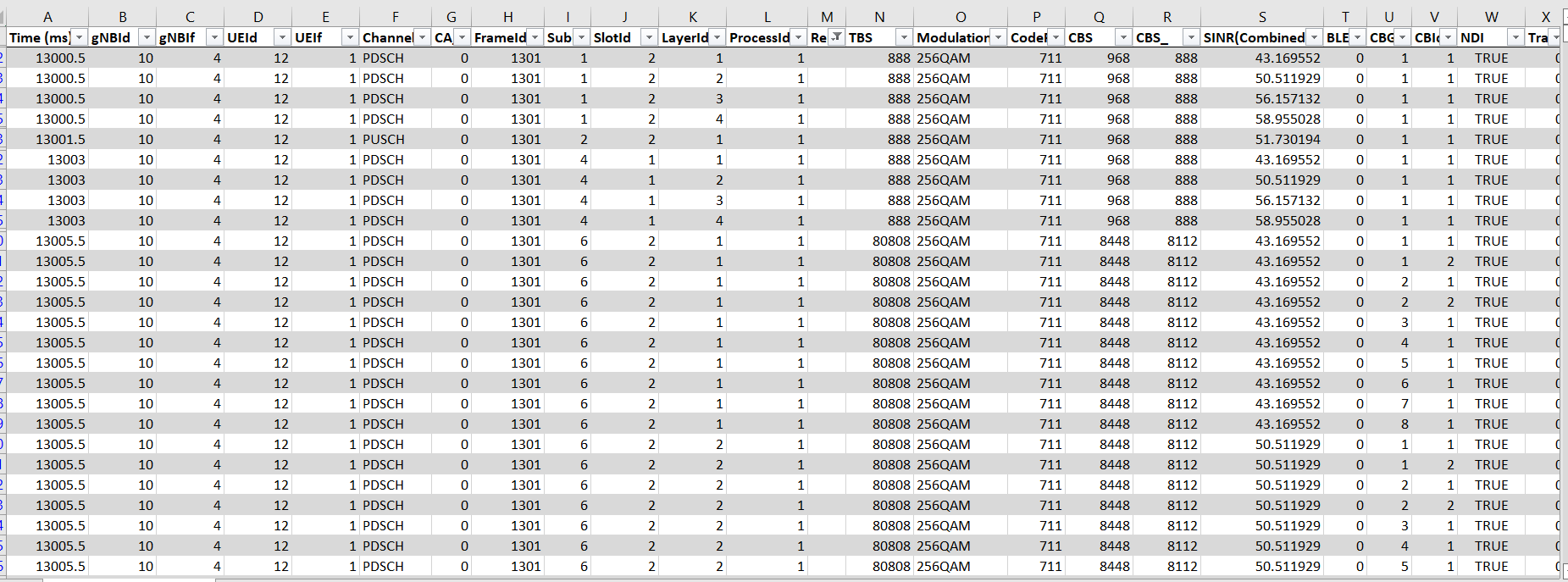
Transmission attempts 1, 2, 3 and 4 are indexed as 0, 1, 2, 3. If the 4th attempt is errored, the CBG is dropped.
Packet trace only logs “packet” flow, and does not log flow of TBs, CBGs etc. Therefore, the packet trace logs a packet in the MAC OUT of the transmitter and subsequently if received successfully at the MAC IN of the receiver. If the packet errored, it is also marked in the packet trace.
Note that if a TB is in error than all the packets that were part of the TB will be marked as error.
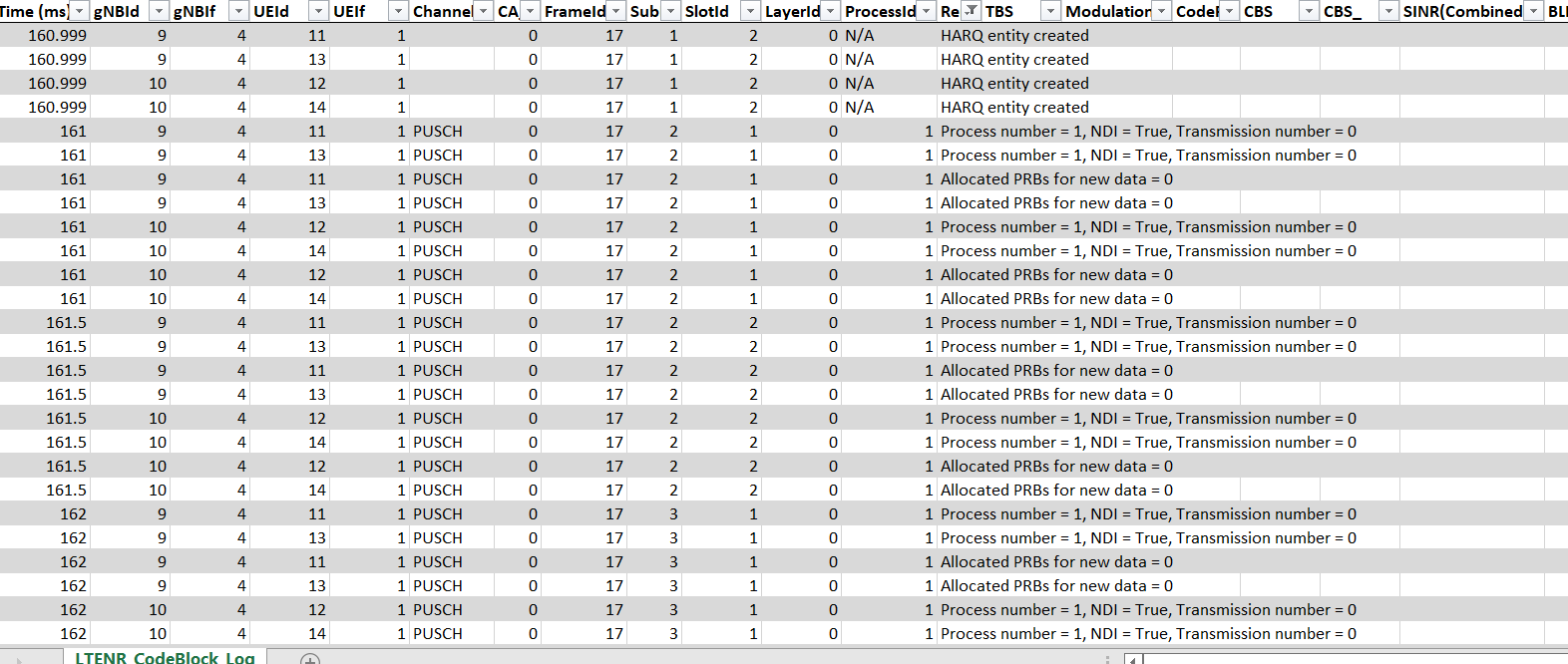
The transmission/re-transmission of CBs is logged in the Code Block logfile.
The remarks column would have messages for HARQ preparation and would be blank for actual transmissions.
TBS is always logged on a per layer basis.
CBGID is also on a per layer basis.
SINR reported in the CBG log is the post-soft combining SINR.
HARQ turn off
There are ongoing discussions of abandoning of HARQ for the 1 ms end-to-end latency use case of URLLC. This decision implies that the code rate had to be lowered such that a single shot transmission, i.e., no retransmissions and no feedback, achieves the required BLER.
NetSim allows users to turn HARQ OFF via the GUI. Note that the code block log will continue to be written. Users will notice that errored CBGs are not retransmitted if HARQ is turned OFF. Since the CB/CBG is in error, that entire TB to which it belongs will be in error.
Users can inspect the packet trace and will see large numbers of packets errors if HARQ is turned OFF and if the UE is seeing a high BLER.
Segmentation of transport block into code blocks
If the transport block size is larger than 3824, a 16-bit CRC is added at the end of the transport block, or a 24-bit CRC is added.
The transport block is divided into multiple equal-sized code blocks when the transport block size exceeds a threshold.
For quasi-cyclic low-density parity-check code (QC-LDPC) base graph 1, the threshold is equal to 8448.
For QC-LDPC base graph 2, the threshold is equal to 3840. In 5G NR, the maximum code block size number is 8448.
An additional 24-bit CRC is added at the end of each code block during segmentation.
A CBG can have up to 2/4/6/8 CBs.
The maximum transport block size – 1,277,992.
LDPC BG 1, CBS Max, (\(K_{cb}\)) = 8448, LDPC BG 2, CBS Max, (\(K_{cb}\)) = 3840
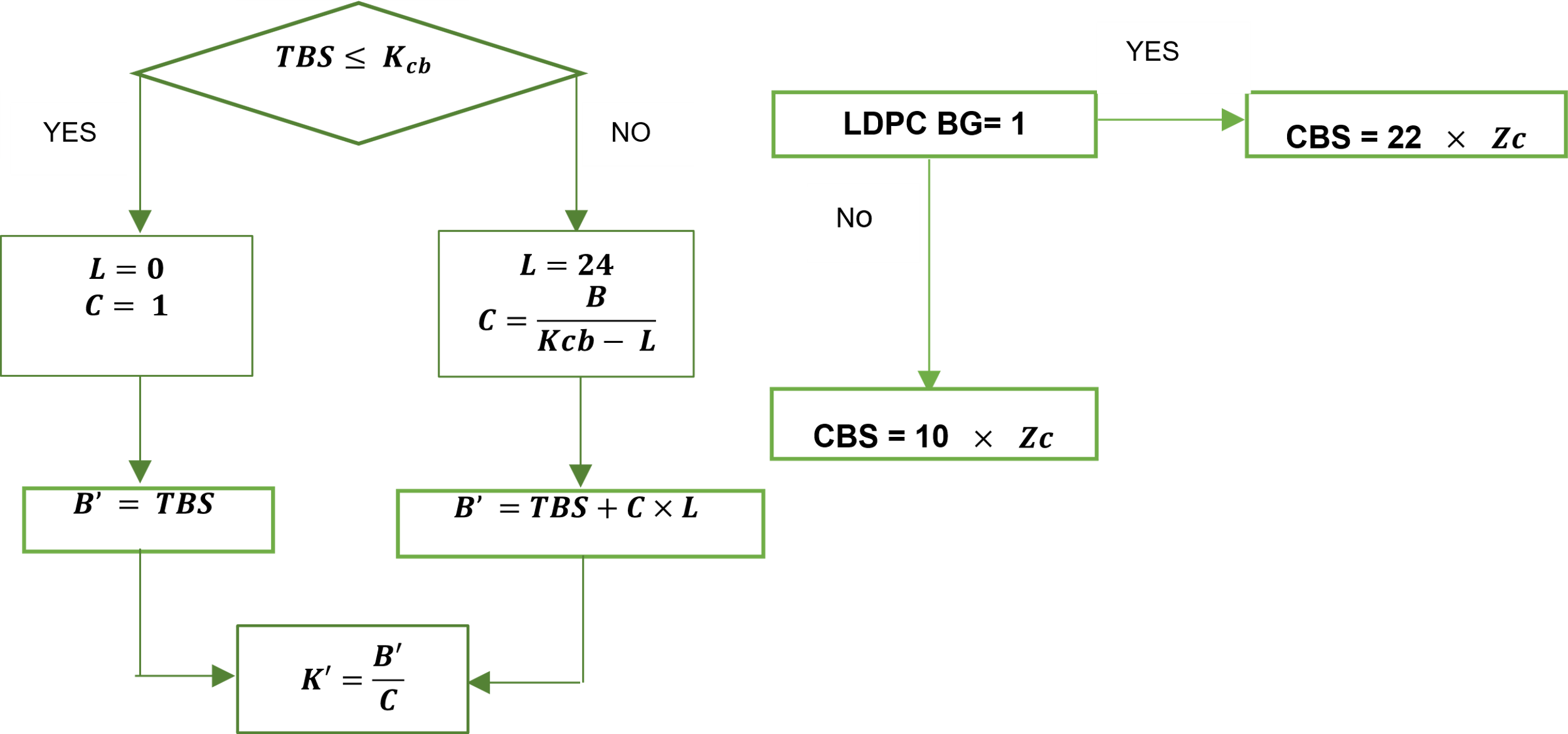
\(L =\) Extra CRC bits, \(C =\) Number of Code blocks, \(TBS =\) Size of Transport block, \(K' =\) Information bits in code block. The base matrix expansion factor \(Z_c\) is calculated by selecting minimum \(Z_c\) in all sets of lifting size tables, such that: \(K_{b} \times Z_c \geq K\). \(K_{b}\) denotes the number of information bit columns for the lifting size \(Z_c\).
BLER and MCS selection
NetSim GUI allows users to set the BLER, via the BLER drop-down option. This option has two settings, and each setting in turn has different options for MCS selection. Both BLER and MCS selection are global options and will apply to all Macro Cell eNBs and UEs in both DL and UL in the network scenario.
Zero BLER
MCS Selection: Ideal Shannon theorem-based rate
Spectral efficiency is calculated assuming ideal Shannon rate whereby:
\[SpectralEfficiency = \log_{2}(1+SINR)\]
Spectral Efficiency – MCS Table 7.2.3-1 (4-bit CQI Table) of standard 36.213 is looked up to select the MCS.
Data is transmitted at this MCS with zero BLER.
MCS Selection: Shannon rate with attenuation factor
Spectral efficiency is calculated per the following expression provided in TR 36.942:
\[SpectralEfficiency = \alpha \times \log_{2}(1+SINR)\]
\(\alpha\) is the attenuation factor and generally \(0.5 \leq \alpha \leq 1.00\). Default: \(0.75\). Spectral Efficiency – MCS Table 7.2.3-1 (4-bit CQI Table) of standard 36.213 is looked up to select the MCS.
Data is transmitted at this MCS with zero BLER.
BLER Enable: Within this, users can set outer loop link adaptation (OLLA) to True or False
OLLA False: The MCS is chosen in the same way as described in the Zero BLER case. Data is, however, transmitted at the chosen MCS, with BLER. The BLER is looked up from NetSim’s proprietary BLER-MCS-SINR curves.
OLLA True: In this case, the user needs to set a target BLER (t-BLER), for example 10%. Based upon the set t-BLER an initial MCS is estimated. Subsequently, the MCS is dynamically adjusted based on an outer-loop link adaptation algorithm that uses HARQ ACK-NACK messages. Note that the t-BLER is based on initial transmission and not after a re-transmission.
PHY measurements
All PHY measurements, downlink and uplink, are done on the actual transmitted data on the data channel. The measurements are not done using the control channels.
The measurements are wideband i.e., a single value of channel state that is deemed representative of all RBs in use. This assumes that the PHY layer that the channel is flat across all the RBs. Such an assumption ensures acceptable accuracy for a system level simulation while keeping the computational complexity manageable.
The SNR in downlink (received by a UE from a eNB/gNB) and in the uplink (received by an eNB/gNB from a UE). The SNR is calculated at every slot and thereafter the SNR gets averaged after every “Average SNR Window” time frame to go forward and compute the AMC (Modulation & coding) information, and for each carrier as:
SNR = Received power / Thermal Noise.
Interference from other UEs / eNBs are not considered.
The received power is transmit power less propagation loss.
The MCS values are chosen based on the received SNR.
Carrier Aggregation
Carrier aggregation is a feature in LTE-A that increases bandwidth and bitrate. An aggregated carrier is known as a component carrier (CC). The component carrier can have a bandwidth of 1.4, 3, 5, 10, 15 or 20 MHz and a maximum of five component carriers can be aggregated. So, the maximum aggregated bandwidth is 100 MHz.
Carrier aggregation can be used: Frequency Division Duplex (FDD) and Time Division Duplex (TDD). The following figure illustrates the use of FDD.
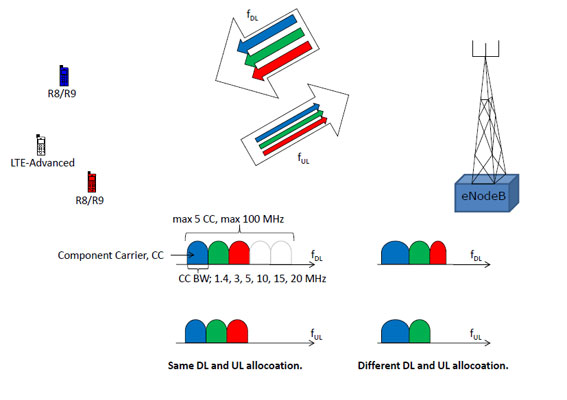
FDD can use different number of component carriers in the Downlink (DL) and Uplink (UL). But, the number of UL component carriers must always be equal to or lower than the number of DL component carriers. Also, the individual component carriers can use different bandwidths.
TDD uses the same number of component carriers with identical bandwidths for DL and UL.
CA Configurations
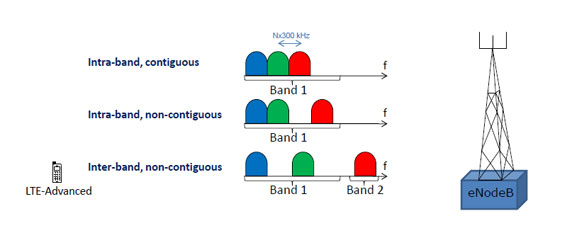
CA can be configured into intra-band (contiguous and non-contiguous) and inter-band non-contiguous. Intra-band contiguous and inter-band combinations, that aggregate two Component Carriers (CCs) in downlink, are specified from Release 10.
The Intra-band contiguous CA configuration refers to contiguous carriers aggregated in the same operating band.
The Intra-band non-contiguous CA configuration refers to non-contiguous carriers aggregated in the same operating band.
The Inter-band CA configuration refers to aggregation of component carriers in different operating bands, where the carriers aggregated in each band can be contiguous or non-contiguous.
The following figure illustrates the CA configurations.
CA Bandwidth Classes
The following table lists the details of the Carrier Aggregation Bandwidth classes in terms of the total number of Resource blocks used by the CC.
For example, Bandwidth class A specifies \(N_{RB,agg} \leq 100\). This means that the Number of the aggregated RBs within the fully allocated Aggregated Channel bandwidth (\(N_{RB,agg}\)) should be less than 100 and the aggregated Tx Bandwidth for class A cannot exceed 20 MHz, and limits to 1 CC in the band.
NOTE: NetSim currently supports CA Bandwidth classes A, B and C only.
| Class | \(N_{RB,agg}\) | Maximum Tx bandwidth | Maximum number of CC |
|---|---|---|---|
| A | \(N \leq 100\) | 20 | 1 |
| B | \(25 < N \leq 100\) | 20 | 2 |
| C | \(100 < N \leq 200\) | 40 | 2 |
| D | \(200 < N \leq 300\) | 60 | 3 |
| E | \(300 < N \leq 400\) | 80 | 4 |
| F | \(400 < N \leq 500\) | 100 | 5 |
| I | \(700 < N \leq 800\) | 160 | 8 |
CA Configuration Naming Conventions
To understand the naming conventions in a CA configuration and the bandwidth combination set usage, let us see the CA_1C configuration. This CA configuration states that the UE can operate on Band 1, with two continuous CCs and with a maximum of 200 RBs. The bandwidth combination set states that the allocation of those 200 RBs can be either 75 RBs on both CCs or 100 RBs on both CCs.
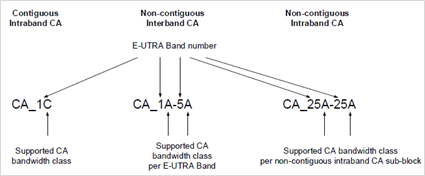
For more information about Carrier Aggregation, see https://www.3gpp.org/technologies/keywords-acronyms/101-carrier-aggregation-explained.
CA Configuration Table (based on TR 36 716 01-01)
Carrier aggregation can be configured in the Macro cell eNB’s Physical layer properties. Following are the various configuration options that are available.
FDD Bands:
| CA Config. | CA Count | CA Type | Freq. Range | UL Low (MHz) | UL High (MHz) | DL Low (MHz) | DL High (MHz) |
|---|---|---|---|---|---|---|---|
| CA_1A_3A | 2 | CA1_UL, CA1_DL, CA2_UL, CA2_DL | FR1 | , 1710 | , 1785 | , 1805 | , 1880 |
| CA_3A_7A | 2 | CA1_UL, CA1_DL, CA2_UL, CA2_DL | FR1 | , 2500 | , 2570 | , 2620 | , 2690 |
| CA_3A_20A | 2 | CA1_UL, CA1_DL, CA2_UL, CA2_DL | FR1 | , 832 | , 862 | , 791 | , 821 |
| CA_3A_28A | 2 | CA1_UL, CA1_DL, CA2_UL, CA2_DL | FR1 | , 703 | , 748 | , 758 | , 803 |
| CA_3A_8A | 2 | CA1_UL, CA1_DL, CA2_UL, CA2_DL | FR1 | , 880 | , 915 | , 925 | , 960 |
| CA_7A_20A | 2 | CA1_UL, CA1_DL, CA2_UL, CA2_DL | FR1 | , 832 | , 862 | , 791 | , 821 |
| CA_7A_28A | 2 | CA1_UL, CA1_DL, CA2_UL, CA2_DL | FR1 | , 703 | , 748 | , 758 | , 803 |
| CA_28A_32A | 2 | CA1_UL, CA1_DL, CA2_UL, CA2_DL | FR1 | , 1452 | , 1496 | , 1452 | , 1496 |
| CA_1A_3A_7A | 3 | CA1_UL, CA1_DL, CA2_UL, CA2_DL, CA3_UL, CA3_DL | FR1 | , 1710, 2500 | , 1785, 2570 | , 1805, 2620 | , 1880, 2690 |
| CA_3A_7A_20A | 3 | CA1_UL, CA1_DL, CA2_UL, CA2_DL, CA3_UL, CA3_DL | FR1 | , 2500, 832 | , 2570, 862 | , 2620, 791 | , 2690, 821 |
| CA_1C | 2 | CA1_UL, CA1_DL, CA2_UL, CA2_DL | FR1 | , 1920 | , 1980 | , 2110 | , 2170 |
| CA_2C | 2 | CA1_UL, CA1_DL, CA2_UL, CA2_DL | FR1 | , 1850 | , 1910 | , 1930 | , 1990 |
| CA_3B | 2 | CA1_UL, CA1_DL, CA2_UL, CA2_DL | FR1 | , 1710 | , 1785 | , 1805 | , 1880 |
| CA_3C | 2 | CA1_UL, CA1_DL, CA2_UL, CA2_DL | FR1 | , 1710 | , 1785 | , 1805 | , 1880 |
| CA_5B | 2 | CA1_UL, CA1_DL, CA2_UL, CA2_DL | FR1 | , 824 | , 849 | , 869 | , 894 |
| CA_7B | 2 | CA1_UL, CA1_DL, CA2_UL, CA2_DL | FR1 | , 2500 | , 2570 | , 2620 | , 2690 |
| CA_7C | 2 | CA1_UL, CA1_DL, CA2_UL, CA2_DL | FR1 | , 2500 | , 2570 | , 2620 | , 2690 |
| CA_8B | 2 | CA1_UL, CA1_DL, CA2_UL, CA2_DL | FR1 | , 880 | , 915 | , 925 | , 960 |
| CA_12B | 2 | CA1_UL, CA1_DL, CA2_UL, CA2_DL | FR1 | , 699 | , 716 | , 729 | , 746 |
| CA_27B | 2 | CA1_UL, CA1_DL, CA2_UL, CA2_DL | FR1 | , 807 | , 824 | , 852 | , 869 |
| CA_28C | 2 | CA1_UL, CA1_DL, CA2_UL, CA2_DL | FR1 | , 703 | , 748 | , 758 | , 803 |
| CA_66B | 2 | CA1_UL, CA1_DL, CA2_UL, CA2_DL | FR1 | , 1710 | , 1780 | , 2110 | , 2200 |
| CA_66C | 2 | CA1_UL, CA1_DL, CA2_UL, CA2_DL | FR1 | , 1710 | , 1780 | , 2110 | , 2200 |
| CA_66D | 2 | CA1_UL, CA1_DL, CA2_UL, CA2_DL | FR1 | , 1710 | , 1780 | , 2110 | , 2200 |
| CA_70C | 2 | CA1_UL, CA1_DL, CA2_UL, CA2_DL | FR1 | , 1695 | , 1710 | , 1995 | , 2020 |
| CA_1A_1A | 2 | CA1_UL, CA1_DL, CA2_UL, CA2_DL | FR1 | , 1920 | , 1980 | , 2110 | , 2170 |
| CA_2A_2A | 2 | CA1_UL, CA1_DL, CA2_UL, CA2_DL | FR1 | , 1850 | , 1910 | , 1930 | , 1990 |
| CA_3A_3A | 2 | CA1_UL, CA1_DL, CA2_UL, CA2_DL | FR1 | , 1710 | , 1785 | , 1805 | , 1880 |
| CA_4A_4A | 2 | CA1_UL, CA1_DL, CA2_UL, CA2_DL | FR1 | , 1710 | , 1755 | , 2110 | , 2155 |
| CA_5A_5A | 2 | CA1_UL, CA1_DL, CA2_UL, CA2_DL | FR1 | , 824 | , 849 | , 869 | , 894 |
| CA_7A_7A | 2 | CA1_UL, CA1_DL, CA2_UL, CA2_DL | FR1 | , 2500 | , 2570 | , 2620 | , 2690 |
| CA_12A_12A | 2 | CA1_UL, CA1_DL, CA2_UL, CA2_DL | FR1 | , 699 | , 716 | , 729 | , 746 |
| CA_23A_23A | 2 | CA1_UL, CA1_DL, CA2_UL, CA2_DL | FR1 | , 2000 | , 2020 | , 2180 | , 2200 |
| CA_25A_25A | 2 | CA1_UL, CA1_DL, CA2_UL, CA2_DL | FR1 | , 1850 | , 1915 | , 1930 | , 1995 |
| CA_66A_66A | 2 | CA1_UL, CA1_DL, CA2_UL, CA2_DL | FR1 | , 1710 | , 1780 | , 2110 | , 2200 |
| CA_66A_66B | 2 | CA1_UL, CA1_DL, CA2_UL, CA2_DL | FR1 | , 1710 | , 1780 | , 2110 | , 2200 |
| CA_66A_66C | 2 | CA1_UL, CA1_DL, CA2_UL, CA2_DL | FR1 | , 1710 | , 1780 | , 2110 | , 2200 |
| CA_25A_25A_25A | 3 | CA1_UL, CA1_DL, CA2_UL, CA2_DL, CA3_UL, CA3_DL | FR1 | , 1850, 1850 | , 1915, 1915 | , 1930, 1930 | , 1995, 1995 |
| CA_66A_66A_66A | 3 | CA1_UL, CA1_DL, CA2_UL, CA2_DL, CA3_UL, CA3_DL | FR1 | , 1710, 1710 | , 1780, 1780 | , 2110, 2110 | , 2200, 2200 |
| BAND_1 | 1 | CA1 | FR1 | ||||
| BAND_2 | 1 | CA1 | FR1 | ||||
| BAND_3 | 1 | CA1 | FR1 | ||||
| BAND_4 | 1 | CA1 | FR1 | ||||
| BAND_5 | 1 | CA1 | FR1 | ||||
| BAND_6 | 1 | CA1 | FR1 | ||||
| BAND_7 | 1 | CA1 | FR1 | ||||
| BAND_8 | 1 | CA1 | FR1 | ||||
| BAND_9 | 1 | CA1 | FR1 | ||||
| BAND_10 | 1 | CA1 | FR1 | ||||
| BAND_11 | 1 | CA1 | FR1 | ||||
| BAND_12 | 1 | CA1 | FR1 | ||||
| BAND_13 | 1 | CA1 | FR1 | ||||
| BAND_14 | 1 | CA1 | FR1 | ||||
| BAND_17 | 1 | CA1 | FR1 | ||||
| BAND_18 | 1 | CA1 | FR1 | ||||
| BAND_19 | 1 | CA1 | FR1 | ||||
| BAND_20 | 1 | CA1 | FR1 | ||||
| BAND_21 | 1 | CA1 | FR1 | ||||
| BAND_22 | 1 | CA1 | FR1 | ||||
| BAND_23 | 1 | CA1 | FR1 | ||||
| BAND_24 | 1 | CA1 | FR1 | ||||
| BAND_25 | 1 | CA1 | FR1 | ||||
| BAND_26 | 1 | CA1 | FR1 | ||||
| BAND_27 | 1 | CA1 | FR1 | ||||
| BAND_28 | 1 | CA1 | FR1 | ||||
| BAND_30 | 1 | CA1 | FR1 | ||||
| BAND_31 | 1 | CA1 | FR1 | ||||
| BAND_65 | 1 | CA1 | FR1 | ||||
| BAND_66 | 1 | CA1 | FR1 | ||||
| BAND_68 | 1 | CA1 | FR1 | ||||
| BAND_70 | 1 | CA1 | FR1 | ||||
| BAND_71 | 1 | CA1 | FR1 | ||||
| BAND_72 | 1 | CA1 | FR1 | ||||
| BAND_73 | 1 | CA1 | FR1 | ||||
| BAND_74 | 1 | CA1 | FR1 | ||||
| BAND_85 | 1 | CA1 | FR1 | ||||
| BAND_87 | 1 | CA1 | FR1 | ||||
| BAND_88 | 1 | CA1 | FR1 |
TDD Bands:
| CA Configuration | CA Count | CA Type | Freq. Range | UL Low (MHz) | UL High (MHz) |
|---|---|---|---|---|---|
| DL_2A-48A_UL_2A-48A_BCS0 | 2 | CA1, CA2 | FR1 | , 3550 | , 3700 |
| DL_2A-48A-48A_UL_2A-48A_BCS0 | 2 | CA1, CA2 | FR1 | , 3550 | , 3700 |
| DL_2A-48A-48C_UL_2A-48A_BCS0 | 2 | CA1, CA2 | FR1 | , 3550 | , 3700 |
| DL_2A-48C_UL_2A-48A_BCS0 | 2 | CA1, CA2 | FR1 | , 3550 | , 3700 |
| DL_2A-48D_UL_2A-48A_BCS0 | 2 | CA1, CA2 | FR1 | , 3550 | , 3700 |
| DL_2A-48A-48D_UL_2A-48A_BCS0 | 2 | CA1, CA2 | FR1 | , 3550 | , 3700 |
| DL_2A-48E_UL_2A-48A_BCS0 | 2 | CA1, CA2 | FR1 | , 3550 | , 3700 |
| DL_2A-48A-48E_UL_2A-48A_BCS0 | 2 | CA1, CA2 | FR1 | , 3550 | , 3700 |
| CA_3DL_41D_3UL_41D_BCS0 | 3 | CA1, CA2, CA3 | FR1 | , 2496, 2496 | , 2690, 2690 |
| CA_4DL_41E_3UL_41D_BCS0 | 4 | CA1, CA2, CA3, CA4 | FR1 | , 2496, 2496, 2496 | , 2690, 2690, 2690 |
| CA_5DL_41F_3UL_41D_BCS0 | 5 | CA1–CA5 | FR1 | (each) | (each) |
| 2DL_48C_2UL_48C_BCS0 | 2 | CA1, CA2 | FR1 | , 3550 | , 3700 |
| 3DL_48D_2UL_48C_BCS0 | 3 | CA1, CA2, CA3 | FR1 | , 3550, 3550 | , 3700, 3700 |
| 4DL_48E_2UL_48C_BCS0 | 4 | CA1–CA4 | FR1 | (each) | (each) |
| CA_48A_48B | 2 | CA1, CA2 | FR1 | , 3550 | , 3700 |
| CA_48B_48B | 2 | CA1, CA2 | FR1 | , 3550 | , 3700 |
| CA_48B_48C | 2 | CA1, CA2 | FR1 | , 3550 | , 3700 |
| CA_48B_48D | 2 | CA1, CA2 | FR1 | , 3550 | , 3700 |
| CA_48B_48E | 2 | CA1, CA2 | FR1 | , 3550 | , 3700 |
| CA_2DL_42A-42A_1UL_BCS1 | 2 | CA1, CA2 | FR1 | , 3400 | , 3600 |
| CA_3DL_42A-42C_2UL_42C_BCS1 | 3 | CA1, CA2, CA3 | FR1 | , 3400, 3400 | , 3600, 3600 |
| CA_4DL_42C-42C_2UL_42C_BCS1 | 4 | CA1–CA4 | FR1 | (each) | (each) |
| 3DL_48A-48C_2UL_48C_BCS0 | 3 | CA1, CA2, CA3 | FR1 | , 3550, 3550 | , 3700, 3700 |
| 4DL_48C-48C_2UL_48C_BCS0 | 4 | CA1–CA4 | FR1 | (each) | (each) |
| BAND_33 | 1 | CA1 | FR1 | ||
| BAND_34 | 1 | CA1 | FR1 | ||
| BAND_35 | 1 | CA1 | FR1 | ||
| BAND_36 | 1 | CA1 | FR1 | ||
| BAND_37 | 1 | CA1 | FR1 | ||
| BAND_38 | 1 | CA1 | FR1 | ||
| BAND_39 | 1 | CA1 | FR1 | ||
| BAND_40 | 1 | CA1 | FR1 | ||
| BAND_41 | 1 | CA1 | FR1 | ||
| BAND_42 | 1 | CA1 | FR1 | ||
| BAND_43 | 1 | CA1 | FR1 | ||
| BAND_44 | 1 | CA1 | FR1 | ||
| BAND_45 | 1 | CA1 | FR1 | ||
| BAND_46 | 1 | CA1 | FR1 | ||
| BAND_47 | 1 | CA1 | FR1 | ||
| BAND_48 | 1 | CA1 | FR1 | ||
| BAND_49 | 1 | CA1 | FR1 | ||
| BAND_50 | 1 | CA1 | FR1 | ||
| BAND_51 | 1 | CA1 | FR1 | ||
| BAND_52 | 1 | CA1 | FR1 | ||
| BAND_53 | 1 | CA1 | FR1 |
Downlink Interference Model
Configuration
Downlink Interference Model can be configured in the eNB’s LTE interface properties under Interference model section of Physical Layer as shown below:
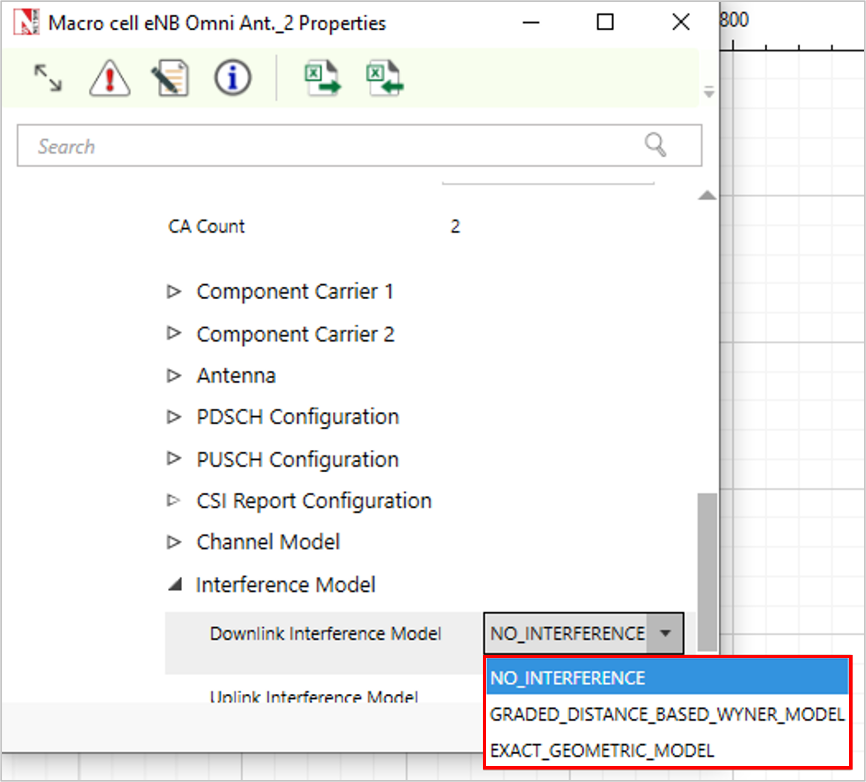
Downlink Interference Model is set to NO INTERFERENCE by default.
Graded distance-based Wyner model
The Wyner model is widely used to model and analyze cellular networks due to its simplicity and analytical tractability. In this model:
Only interference from (two) adjacent cells is considered.
Random user locations and path loss variations are ignored.
The interference intensity from each neighboring base station (BS) is characterized by a single fixed parameter \(0 \leq \alpha \leq 1\).
The channel gain between BS and its home user is 1 and the intercell interference intensity is \(\alpha\).
Thus, a user sees a constant interference irrespective of its location.
These three simplifications lose a lot of information. We alter the Wyner model to address these flaws by:
Considering interference from arbitrary number of BSs.
Factoring in the user location. The UEs distance from the interfering BS is an obvious factor that determines the interference intensity since the amount of interference caused depends on the signal attenuation with distance, the path loss law. Since the Wyner model uses relative interference, the ratio of a UEs distance from serving and interfering BSs is used as one of the interference parameters.
Using a graded interference intensity model, whereby a UE will see a different value of \(\alpha\) at different locations, thereby modelling the effect of interference more accurately.
Technical description
We model DL interference from any number of interfering BSs. Let \(BS_{i}\) be the serving BS to \(UE_{k}\). Let \(BS_{j}\) be any other BS (\(j \neq i\)). Then the distance between \(UE_{k}\) and \(BS_{i}\) is denoted as \(D_{UE_{k}}^{BS_{i}}\), while the distance between UE and \(BS_{j}\) is denoted as \(D_{UE_{k}}^{BS_{j}}\).
A UE sees interference if \(\frac{D_{UE_{K}}^{BS_{j}}-D_{UE_{K}}^{BS_{i}}}{D_{UE_{K}}^{BS_{j}}}\) is within a user defined threshold (for example, 20%). This ratio is also equal to \(1-\frac{D_{UE_{k}}^{BS_{i}}}{D_{UE_{K}}^{BS_{j}}}\). When \(D_{UE_{K}}^{BS_{i}} \leq D_{UE_{K}}^{BS_{j}}\), we see that \(0 \leq \frac{D_{UE_{K}}^{BS_{j}}-D_{UE_{K}}^{BS_{i}}}{D_{UE_{K}}^{BS_{j}}} \leq 1\). The ratio is \(0\) when \(D_{UE_{K}}^{BS_{i}}=D_{UE_{K}}^{BS_{j}}\) and is \(1\) when \(D_{UE_{K}}^{BS_{i}}=0\). When \(D_{UE_{K}}^{BS_{i}}=D_{UE_{K}}^{BS_{j}}\) the UE is equidistant from both BS i.e., at the cell edge. When \(D_{UE_{K}}^{BS_{i}}=0\), the UE is at the centre of the serving BS, \(BS_{i}\).
Users at the cell-edge will see out of cell interference; as the user moves closer to the cell centre, it sees lesser interference.
We call this user defined threshold as differential distance ratio threshold and denote it by \(DDR_{th}\). The DDR threshold is used to define \(K\) thresholds, which are in turn used to determine the out of cell interference experienced by \(UE_{k}\), as explained below. First, we bin the \(DDR_{th}\), conditional on \(D_{UE_{K}}^{BS_{i}} \leq D_{UE_{K}}^{BS_{j}}\), into K steps, as follows:
\[0 \leq \frac{D_{UE_{K}}^{BS_{j}}-D_{UE_{K}}^{BS_{i}}}{D_{UE_{K}}^{BS_{j}}} < \left(\frac{DDR_{th}}{K}\right) \times 1\]
\[\left(\frac{DDR_{th}}{K}\right) \times 1 \leq \frac{D_{UE_{K}}^{BS_{j}}-D_{UE_{K}}^{BS_{i}}}{D_{UE_{K}}^{BS_{j}}} < \left(\frac{DDR_{th}}{K}\right) \times 2\]
\[\ldots\]
\[\ldots \left(\frac{DDR_{th}}{K}\right) \times (K-1) \leq \frac{D_{UE_{K}}^{BS_{j}}-D_{UE_{K}}^{BS_{i}}}{D_{UE_{K}}^{BS_{j}}} < \left(\frac{DDR_{th}}{K}\right) \times K\]
\[\left(\frac{DDR_{th}}{K}\right) \times K \leq \frac{D_{UE_{K}}^{BS_{j}}-D_{UE_{K}}^{BS_{i}}}{D_{UE_{K}}^{BS_{j}}}\]
Where \(DDR_{th}\), is a user input varying from 0.00 to 1.00 (default is 0.1 or 10%).
K: the number of steps, is a user input varying from 1 to 4 (default is 1).
The relative interference for each of these steps would be \(I_{n}\) \((0 \leq n \leq K)\) where \(K\) is the number of steps and \(n\) represents each individual step (\(n=p\) if the \(p^{th}\) inequality in the above is satisfied, counting the first inequality as the zeroth inequality).
We specify the interference power relative to the power received from \(BS_{i}\). Therefore, given the value of \(I_{n}\), interference power is calculated as the received power from \(BS_{i}\) (excluding beamforming gain) less \(I_{n}\). Thus:
\[\text{InterferencePower from } BS_{j}\,(dB) = \text{ReceivedPower from } BS_{i}\,(dBm) - I_{n}^{j}\,(dB)\]
Therefore, we have \(I_{n}^{i}(dB) = P_{serving}^{BS}(dBm) - P_{Interfering}^{BS}(dBm)\). This is equivalent to the Wyner model with \(\alpha = \frac{P_{Interfering}^{BS}}{P_{serving}^{BS}}\) in the linear scale; however, note that in our interference model, \(\alpha\) depends on the UE’s location, because \(I_{n}\) depends on the distance.
This interference powers (linear) from all interfering BSs are added to the noise power (in linear scale) and then:
\[SINR = \frac{\text{Received power from } BS_{i} + \text{BeamFormingGain}}{\text{NoisePower} + \sum \text{InterferencePower}}\]
Each \(I_{n}\) is a user input. It is subject to the limits \(0 \leq I_{n} \leq 20\,\text{dB}\). NetSim will enforce the sanity check \(20 \geq I_{K} \geq I_{K-1} \geq \ldots \geq I_{0} \geq 0\). Here \(I_{K}\) is the relative interference seen when the UE is near \(BS_{i}\) and \(I_{0}\) is the relative interference seen when the UE is nearly equidistant from its two nearest BSs (and hence far from \(BS_{i}\)).
In an ideal case, when the user is at the cell edge, the received power from \(BS_{i}\) will be roughly equal to the received power from \(BS_{j}\) (since it is equidistant from the two BSs), and so \(SINR_{CellEdge}\) will necessarily be less than 0 dB.
As the UE moves away from the cell edge and towards \(BS_{i}\), the received power from \(BS_{i}\) increases and that from \(BS_{j}\) decreases, and so the SINR improves. For this reason, we have the limits on \(I_{n}\) as \(0\,\text{dB} \leq I_{n} \leq 20\,\text{dB}\). If the user sets \(I_{n}\) to a large value, it will be equivalent to having no inter-cell interference.
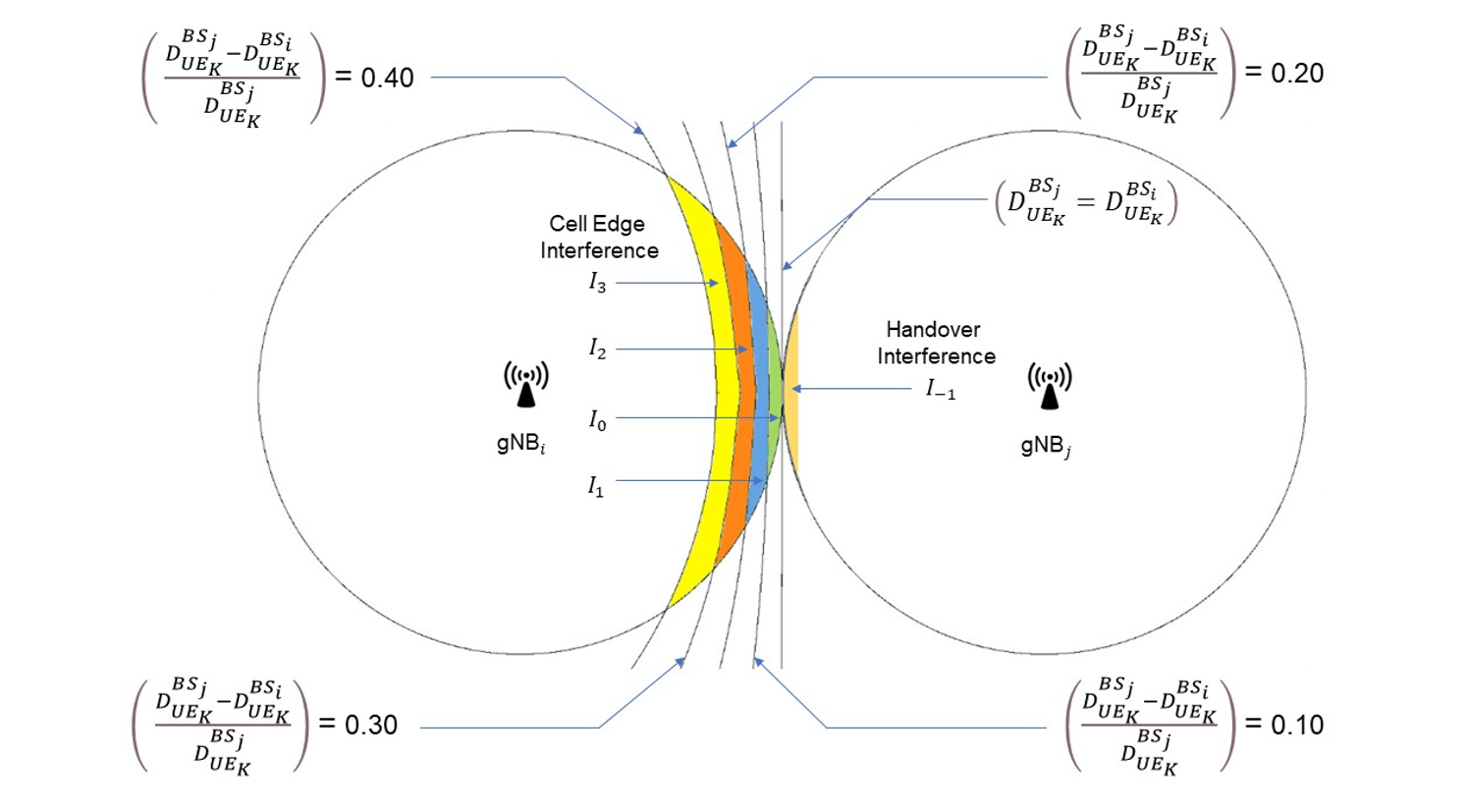
In case \(\frac{D_{UE_{K}}^{BS_{j}}-D_{UE_{K}}^{BS_{i}}}{D_{UE_{K}}^{BS_{j}}} > DDR_{th}\), the out of cell interference seen at the UE is set to \(I_{K}\). The default value of \(I_{K}\) is 0, i.e., cell centre users do not see any out of cell interference. The default values of \(I_{k}\) for \(k=1, 2, \ldots, K-1\) is 10 dB.
In NetSim, handover is triggered when the signal strength from \(BS_{j}\) is offset (3 dB by default) higher than signal strength from \(BS_{i}\). A handover is not triggered when \(UE_{k}\) is equidistant from both BSs but only when it is slightly nearer to \(BS_{j}\). Therefore, the short time when \(D_{UE_{K}}^{BS_{i}} \geq D_{UE_{K}}^{BS_{j}}\) is a special case requiring a different interference power. We term this interference as “Handover interference” and is a separate user input. Handover interference is denoted as \(I_{-1}\) and \(-3\,\text{dB} \leq I_{-1} \leq 0\,\text{dB}\).
Exact Geometric Model
NetSim supports various 3GPP propagation models. These models are used to calculate the pathloss between every BS (eNB) and UE. One the parameters in the pathloss equations is the distance between the BS and the UE. Some of the other user settable parameters used in the 3GPP models are (i) Centre frequency (chosen from the band selected) (ii) Rural or Urban environments (iii) UE-BS channel is in LOS or NLOS (iv) Shadow-fading in the UE-BS channel (v) Indoor or outdoor UE location, etc., are also supported in NetSim.
Let \(BS_{i}\) be the serving BS to \(UE_{k}\). Let \(BS_{j}\) be any other BS (\(j \neq i\)). \(UE_{k}\) communicates with \(BS_{i}\) while all other BSs (\(j \neq i\)) act as interferers.
The distance between \(UE_{k}\) and \(BS_{i}\) is denoted as \(D_{UE_{k}}^{BS_{i}}\), while the distance between UE and \(BS_{j}\) is denoted as \(D_{UE_{k}}^{BS_{j}}\). The power of the interfering signal from any \(BS_{j}\) at any \(UE_{k}\) depends on (i) the transmit power of the interfering BS and (ii) pathloss between the interfering BS and the UE. It can therefore be expressed as:
\[I_{UE_{k}}^{BS_{j}} = P^{BS_{j}} - PL_{UE_{k}}^{BS_{j}}\]
where \(P^{BS_{j}}\) is the transmit power of \(BS_{j}\), \(PL_{UE_{k}}^{BS_{j}}\) represents the 3GPP model based pathloss between \(BS_{j}\) and \(UE_{k}\). This pathloss is dependent on \(D_{UE_{k}}^{BS_{j}}\) and the channel between \(BS_{j}\) and \(UE_{k}\). The interference powers (linear) from all interfering BSs (i.e., apart from the serving BS) are added to the noise power (in linear scale) and we get the expression:
\[SINR_{UE_{k}} = \frac{\text{Received power from } BS_{i} + \text{BeamFormingGain}}{\text{NoisePower} + \sum_{j} I_{UE_{k}}^{BS_{j}}}\]
The Wyner model is approximate but is computationally faster; the geometric model is precise but computationally slower due to the calculations involved.
Interference modeling in OFDM in NetSim
NetSim doesn’t model the allocation of specific subcarriers to individual users. The aggregate resources are divided among the UEs per UEs’ requirements and the scheduling algorithm.
The received power at \(UE_{k}\) from \(BS_{i}\), with transmit power \(P_{i}\) is given (in the linear scale) as:
\[P_{UE_{k}}^{BS_{i}} = \frac{P_{i}}{PL_{UE_{k}}^{BS_{i}}}\]
\(I_{ik}^{j}\) or the interference in linear scale at a \(UE_{k}\) (associated with \(BS_{i}\)) from \(BS_{j}\).
To normalize the power should we further multiply by the ratio given below:
\[I_{ik} = \Sigma_{j}\, I_{ik}^{j} \times \left(\frac{RB_{UE_{k}}^{slot}}{RB_{total}^{slot}}\right)\]
Assumptions:
The above formula assumes the interference seen by \(UE_{k}\) is proportional to the number of RBs allotted to \(UE_{k}\).
Fast fading is not accounted for in the interference calculations since it would require too much computational time, given that it needs to be re-calculated every coherence time.
The total noise seen will be:
\[k \times T \times RB_{UE_{k}}^{slot}\]
The signal power \(P_{UE_{k}}^{BS_{i}} \times \left(\frac{RB_{UE_{k}}^{slot}}{RB_{total}^{slot}}\right)\)
Therefore,
\[SINR = \frac{P_{UE_{k}}^{BS_{i}} \times \left(\frac{RB_{UE_{k}}^{slot}}{RB_{total}^{slot}}\right)}{k \times T \times RB_{UE_{k}}^{slot} + \Sigma_{j}\, I_{ik}^{j} \times \left(\frac{RB_{UE_{k}}^{slot}}{RB_{total}^{slot}}\right)} = \frac{P_{UE_{k}}^{BS_{i}}}{k \times T \times RB_{total}^{slot} + \Sigma_{j}\, I_{ik}^{j}}\]
Interference in MIMO
If \(UE_{k}\) is receiving from \(BS_{i}\) in multiple layers, the interference power \(I_{ik}^{j}\) is the same for all layers.
\[SINR_{L} = \frac{P_{UE_{k}}^{BS_{i}} \times \lambda_{L}}{k \times T \times RB_{total}^{slot} + \Sigma_{j}\, I_{ik}^{j}}\]
Where \(L\) represents a MIMO layer.
Note that neither the noise nor the interference is divided by the layer count, because the combining vector has unit norm.
Limitations
The interference formula assumes that all interfering BSs transmit data in that slot.
Calculations must be performed for each slot. Enabling interference in the UI will slow down the simulation.
Data rate calculation
For NR (New Radio), the approximate data rate for a given number of aggregated carriers in a band or band combination is computed as follows.
\[\text{Data rate (in Mbps)} = 10^{-6} \cdot \sum_{j=1}^{J} \left( v_{\text{Layers}}^{(j)} \cdot Q_{m}^{(j)} \cdot f^{(j)} \cdot R_{max} \cdot \frac{N_{PRB}^{BW(j),\mu} \cdot 12}{T_{s}^{\mu}} \cdot \left(1 - OH^{(j)}\right) \right)\]
Where:
\(J\) is the number of aggregated component carriers in a band or band combination.
\(R_{max} = 948/1024\)
For the \(j\)-th CC,
\(v_{\text{Layers}}^{(j)}\) is the maximum number of supported layers given by higher layer parameter maxNumberMIMO-LayersPDSCH for downlink and maximum of higher layer parameters maxNumberMIMO-LayersCB-PUSCH and maxNumberMIMO-LayersNonCB-PUSCH for uplink.
\(Q_{m}^{(j)}\) is the maximum supported modulation order given by higher layer parameter supportedModulationOrderDL for downlink and higher layer parameter supportedModulationOrderUL for uplink.
\(f^{j}\) is the scaling factor given by higher layer parameter scalingFactor and can take the values 1.
\(\mu\) is the numerology (value is always 0).
\(T_{s}^{\mu}\) is the average OFDM symbol duration in a subframe for numerology \(\mu\), i.e. \(T_{s}^{\mu} = \frac{10^{-3}}{14 \times 2^{\mu}}\). Note that normal cyclic prefix is assumed.
\(N_{PRB}^{BW(j),\mu}\) is the maximum RB allocation in bandwidth \(BW^{(j)}\) with numerology \(\mu\).
\(OH^{(j)}\) is the overhead and takes the following values.
0.14, for frequency range for DL
0.08, for frequency range for UL
NOTE: For a cell operating with SUL (Supplementary Uplink), only one of the UL or SUL carriers (the one with the higher data rate) is counted.
LTE Metrics
LTE Packet trace
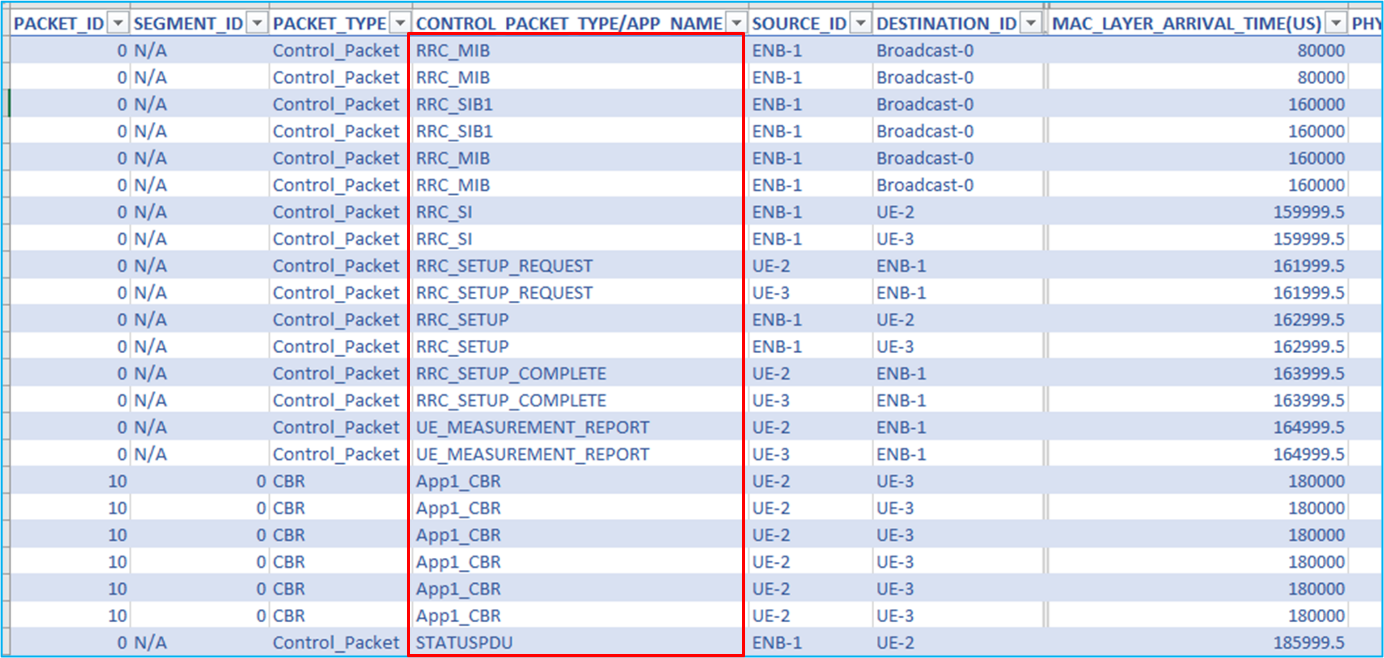
The LTE packet trace file includes a column for the field CONTROL PACKET TYPE. This field contains information about control and data packets, It includes control packets related to RRC connections (RRC MIB, RRC SIB1, RRC SETUP REQUEST, RRC SETUP COMPLETE, RRC SETUP), UE MEASUREMENT REPORT, and STATUSPDU.
Limitations
NetSim’s LTE module has been developed as a special case of the 5G NR library operating in the FR1 band with \(\mu = 0\). As a result, some 5G NR output metrics, such as the SDAP metrics, may appear in the LTE results. These can be ignored.
Radio measurements log file
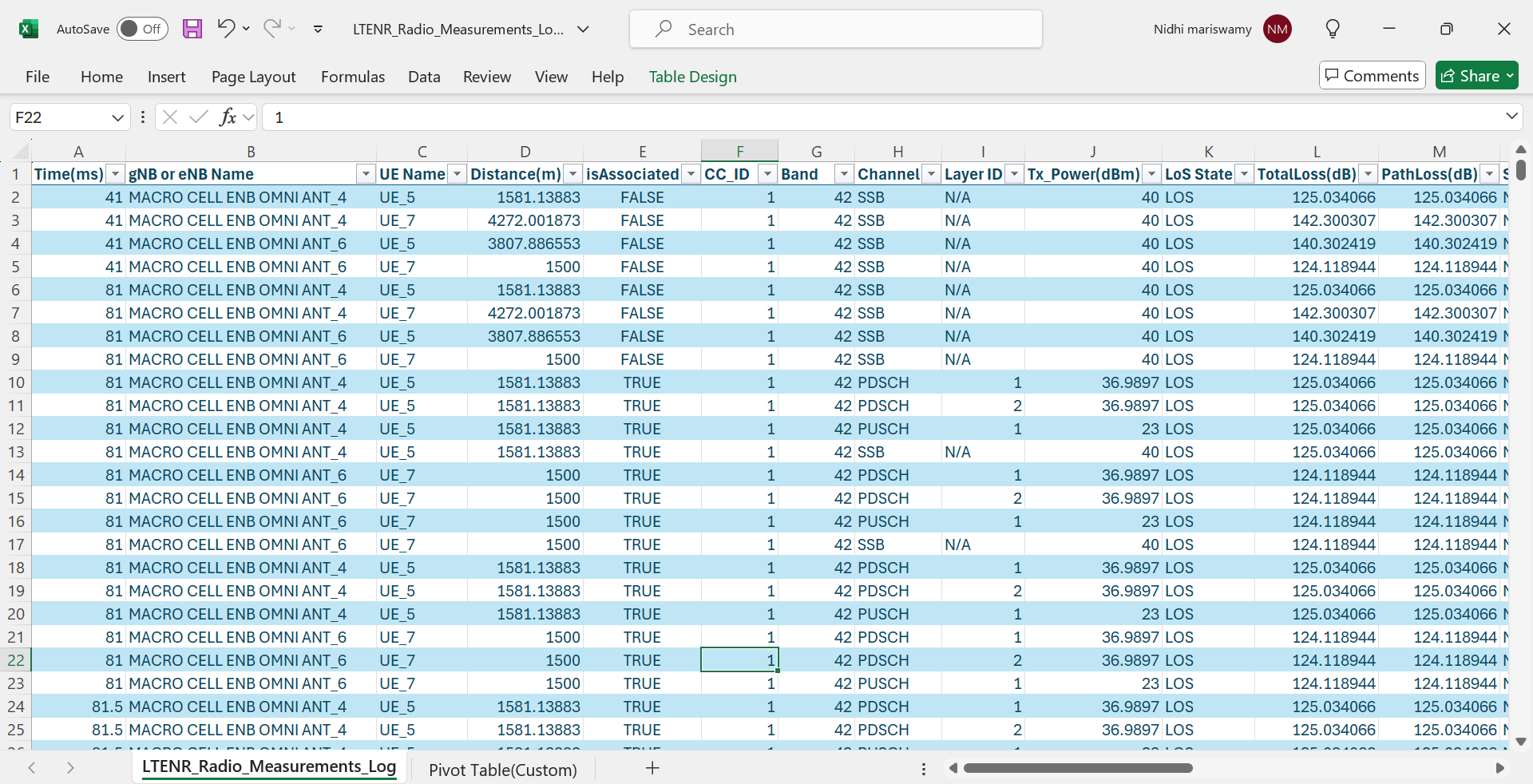
NetSim’s LTENR Radio Measurements CSV log file records path loss, shadow fading loss, received power, SNR, Interference Power, SINR, MCS, CQI, and Beamforming gain.
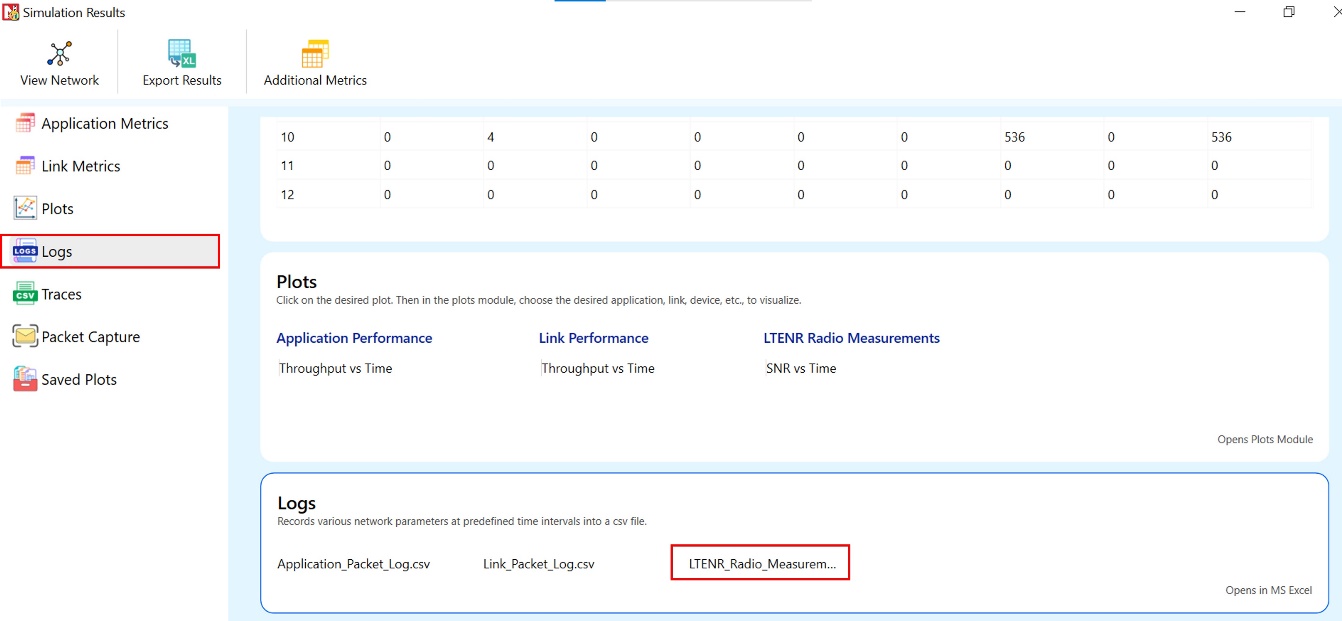
The LTENR Radio Measurements log can be enabled by clicking on “Configure Reports” in the top ribbon \(>\) Plots \(>\) Select LTENR Radio Measurements Log under Network Logs as shown below.
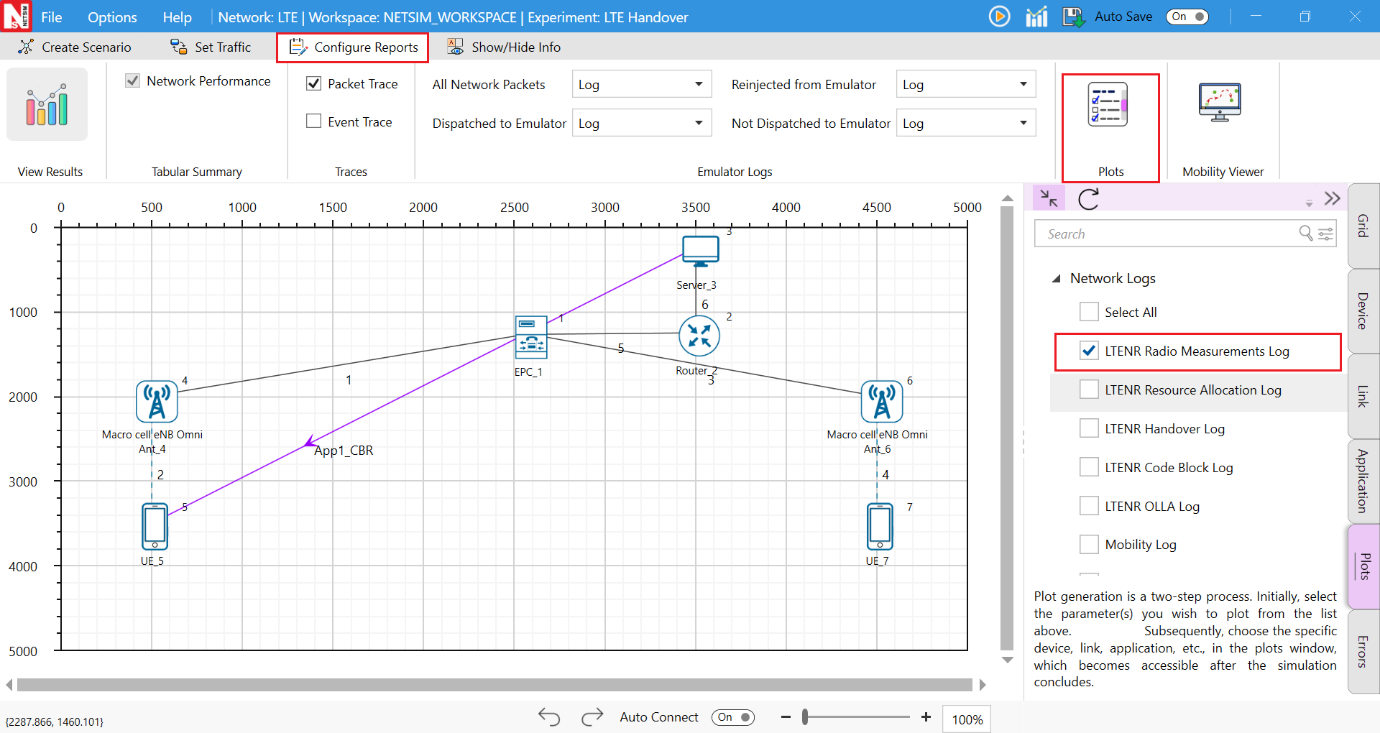
The LTENR Radio Measurement Log.csv file will contain the following information:
Time in Milliseconds
gNB/eNB Name
UE Name
Distance between the gNB/eNB and the UE in meters
Association Status (True/False)
Carrier ID (CC ID)
Channel Type (PDSCH/PUSCH/SSB)
MIMO Layer ID
Transmitter Power in dBm
LoS State
Total Loss in dB
Pathloss in dB
Shadow Fading Loss in dB
Additional loss dB
Received Power in dBm
SNR in dB
SINR in dB
O2I (Outdoor to indoor) penetration loss in dBm
Interference Power in dBm
Beamforming gain in dB
CQI Index
MCS Index
The log file can be accessed from the Simulations Results Window under the logs as shown below.
Implementation details and Assumptions:
The PDSCH channel corresponds to the downlink.
The PUSCH channel corresponds to the uplink.
The SSB channel corresponds to the control channel.
Parameters associated with PDSCH and PUSCH channels are logged at every slot only for associated gNB-UE pairs.
Parameters associated with SSB channel are logged once during initialization and subsequently during each mobility event.
Initially only SSB channel entries will be found in the log since gNB-UE association takes time.
The SSB control channel transmission is over a single layer. Analog beamforming gain is logged for this channel and is used for SSB received power computation.
Interference is not modelled for the SSB channel and hence SINR and Interference Power parameters are not logged.
The SNR computed for SSB channel is used for control decisions such as Association and Handover. It is not used to calculate the MCS/CQI Index which is used to determine PDSCH/PUSCH rate.
Radio resource allocation log file
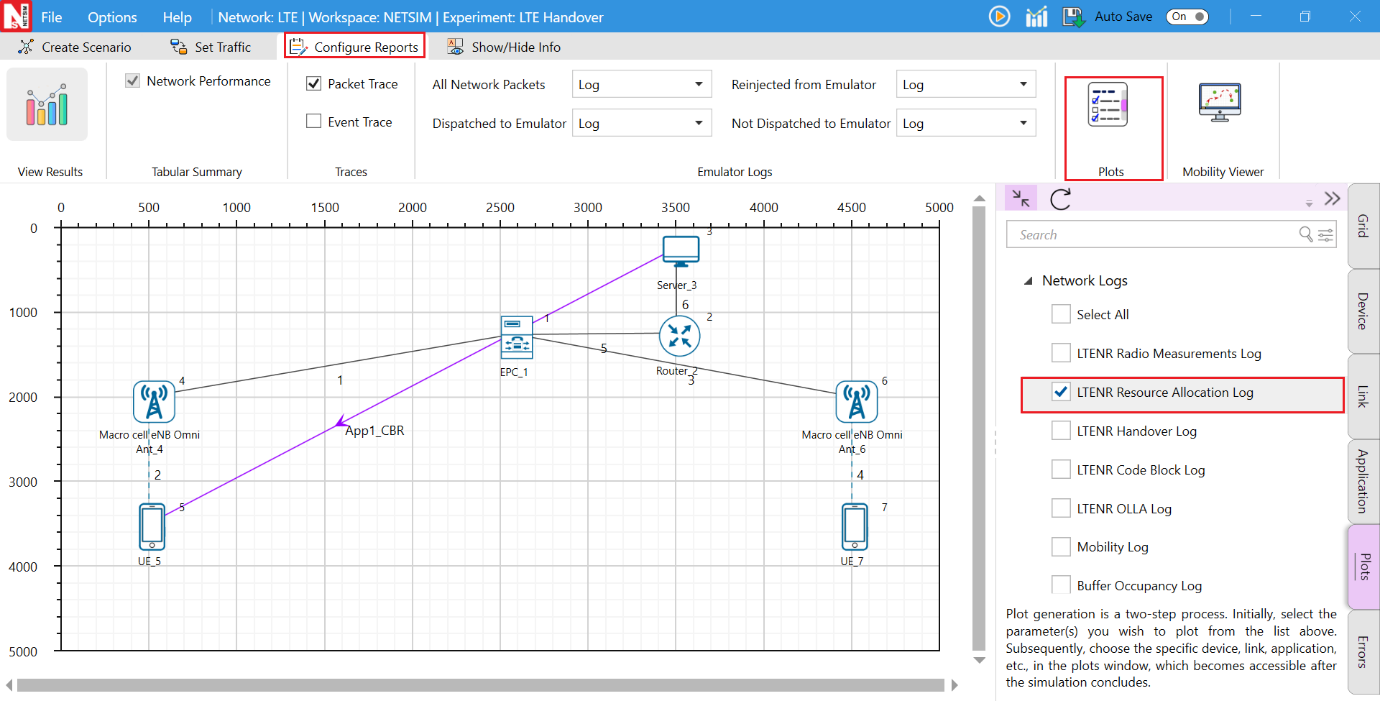
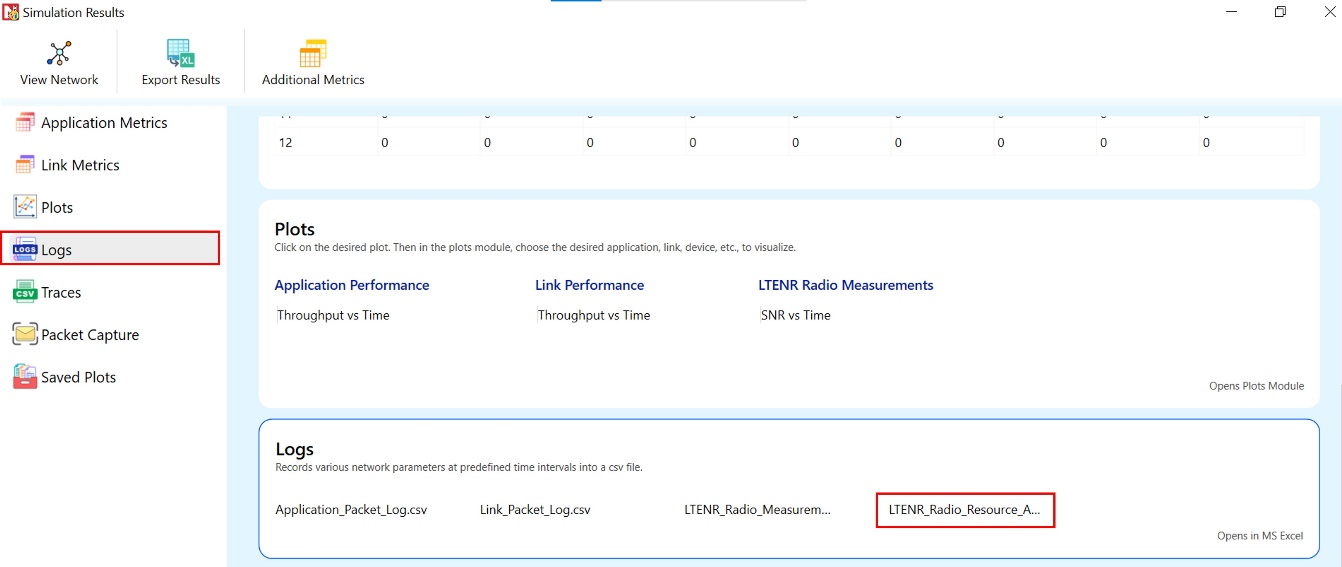
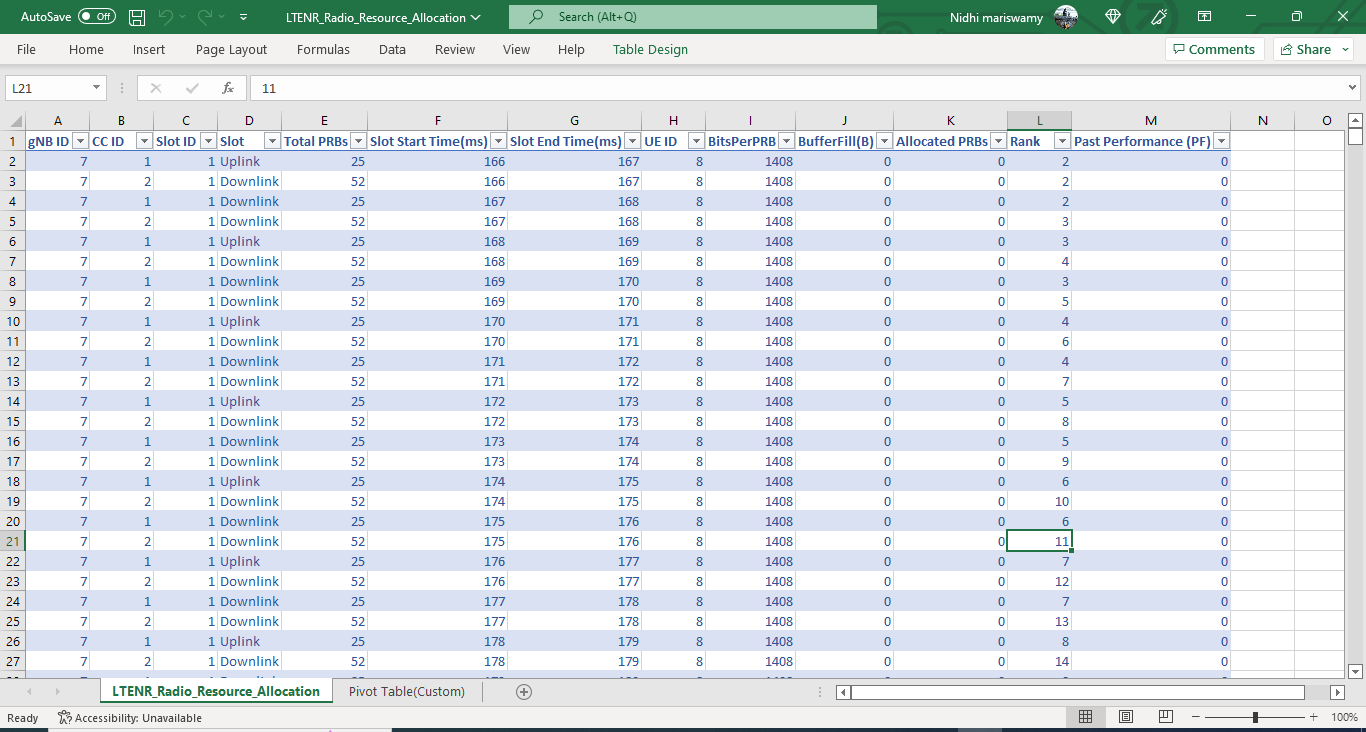
NetSim’s 5G Radio Resource Allocation CSV log file records information related to physical resource block allocation such as the Total PRBs, Slot Start Time (ms), Slot End, Bits Per PRB, Buffer Fill, Allocated PRBs, etc.
The LTENR Resource Allocation log can be enabled by clicking on configure reports in top ribbon \(>\) Logs \(>\) Select LTENR Resource Allocation as shown below.
The LTE Radio Resource Allocation.csv file will contain the following information:
gNB ID
Component Carrier ID
Slot ID
Slot
Total PRBs
Slot Start Time (ms)
Slot End Time (ms)
UE ID
BitsPerPRB
BufferFill (B)
Rank
Allocated PRBs
Past Performance
The log file can be accessed from the Simulations Results Window under the Logs as shown below.
Implementation details and assumptions:
In the case of scheduling algorithms such as Max Throughput when all PRB’s are allocated to one UE, the entries for the other UEs for which allocation did not happen is not written to the log file.
Rank is a metric used for resource allocation.
Handover Log file
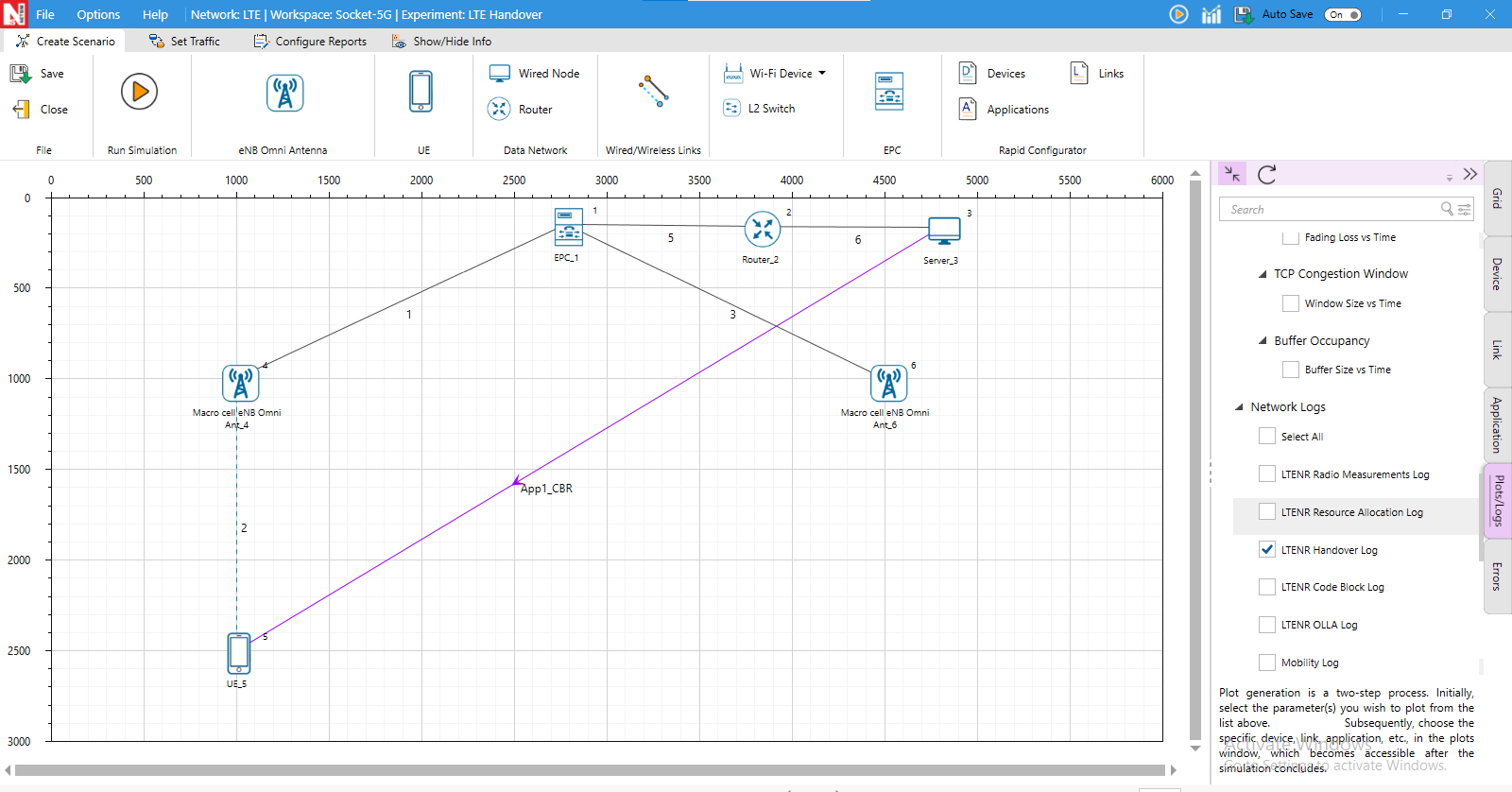
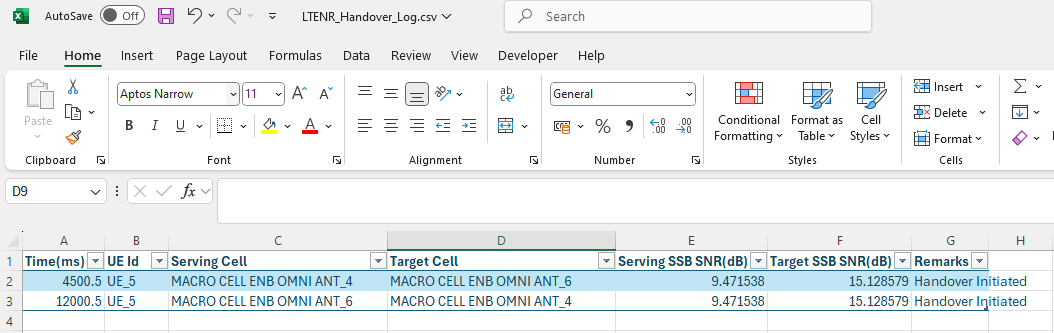
The NetSim Handover Log records events occurring during a handover. This includes the timestamp, UE ID, serving cell ID, target cell ID, Serving SSB SNR (dB), Target SSB SNR (dB), and Remarks (the time at which handover initiation and handover offset were met) when the TTT parameter is enabled. This log can be used to identify handover attempts and analyze the impact of TTT on handovers.
The LTENR Handover Log can be enabled by clicking on Configure Reports in the top ribbon \(>\) Plots \(>\) Select LTENR Handover Log under Network Logs, as shown below.
The LTE Handover Log.csv file will contain the following information:
Time in microseconds
UE ID
Serving cell
Target cell
Serving SSB SNR (dB)
Target SSB SNR (dB)
Remarks
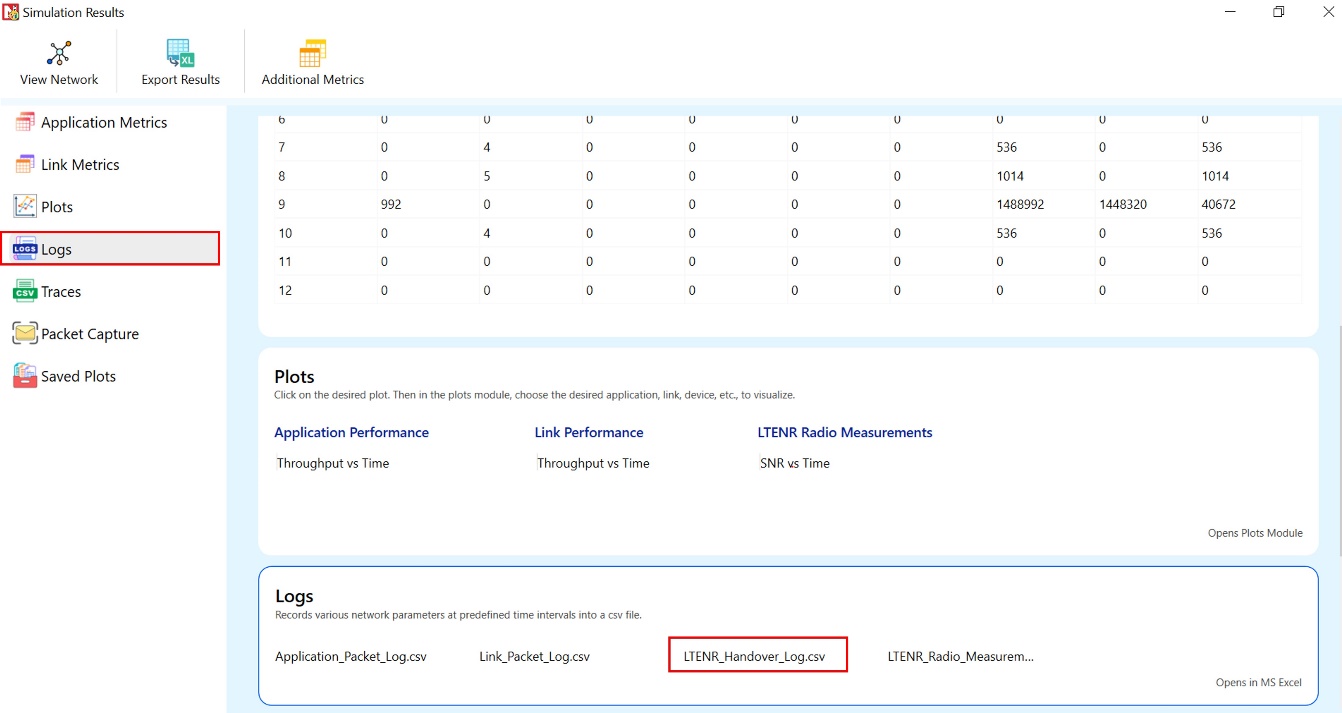
The log file can be accessed from the Simulations Results Window under the log file drop down in the left pane.
Code Block Log file
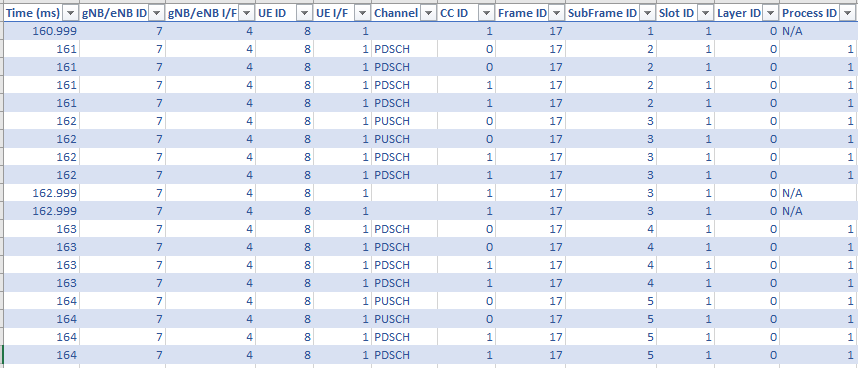
NetSim’s Code Block Log records parameters associated with Code Block Segmentation, such as Process ID, TB Size, Modulation, Code Rate, CBS, BLER, CBG ID, and more, along with remarks on events associated with HARQ and PRB allocation events. This log is useful for understanding the BLER model and Code Block Segmentation in 5G.
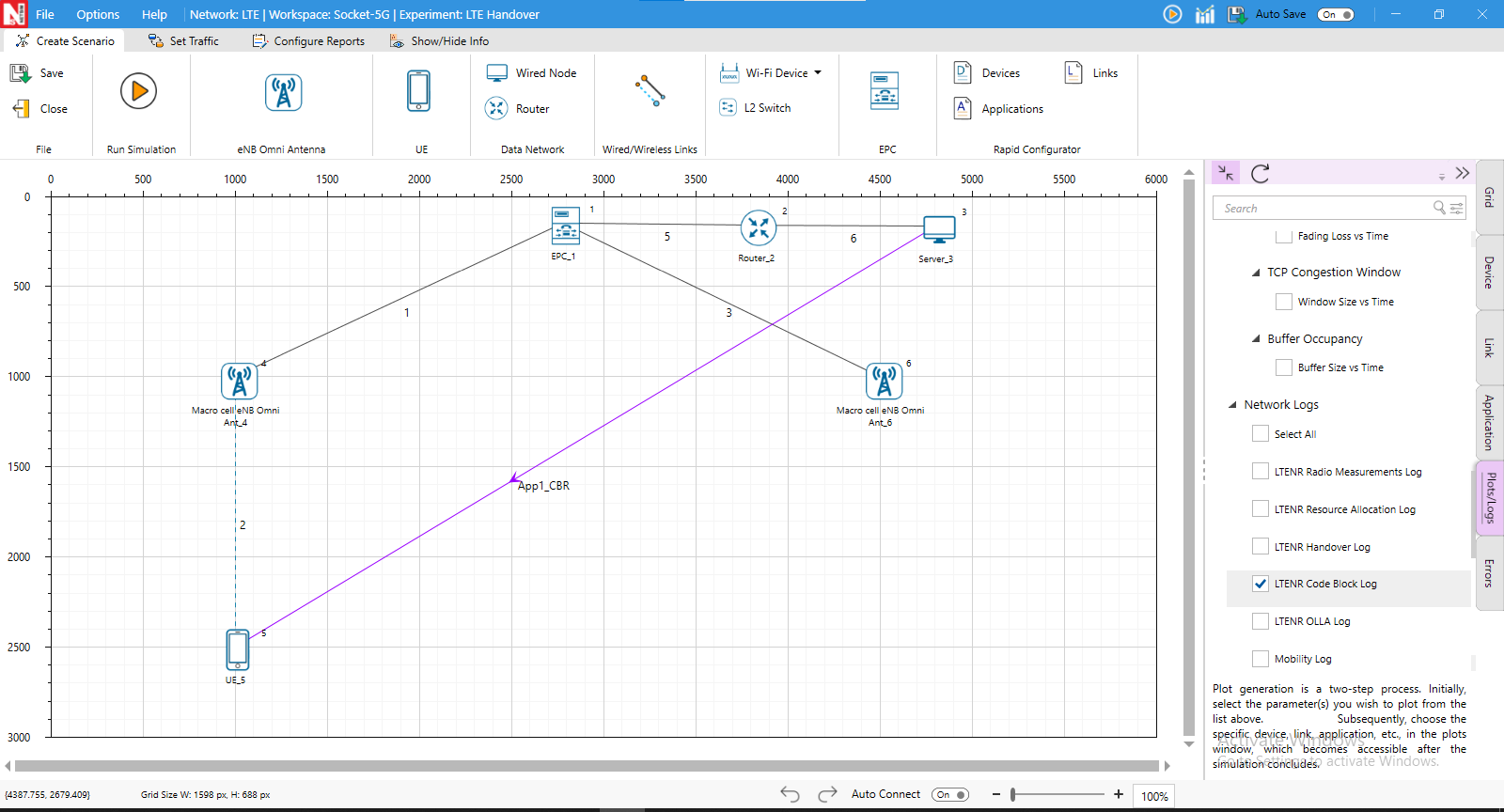
The LTENR Code Block Log can be enabled by clicking on Configure Reports in the top ribbon \(>\) Plots \(>\) Select Code Block Log under Network Logs, as shown below.
The LTE_CodeBlock_Log.csv file will contain the following information:
Time in milliseconds
gNB/eNB ID
gNB/eNB I/F (Interface)
UE ID
UE I/F (Interface)
Channel Type (PDSCH/PUSCH)
Carrier ID (CC ID)
Frame ID
Subframe ID
Slot ID
Layer ID
Process ID
Remarks
Transport Block Size
Modulation
Code Rate
Code Blocks
SINR
BLER
CBG ID
CB ID
NDI
Transmission Number
Status
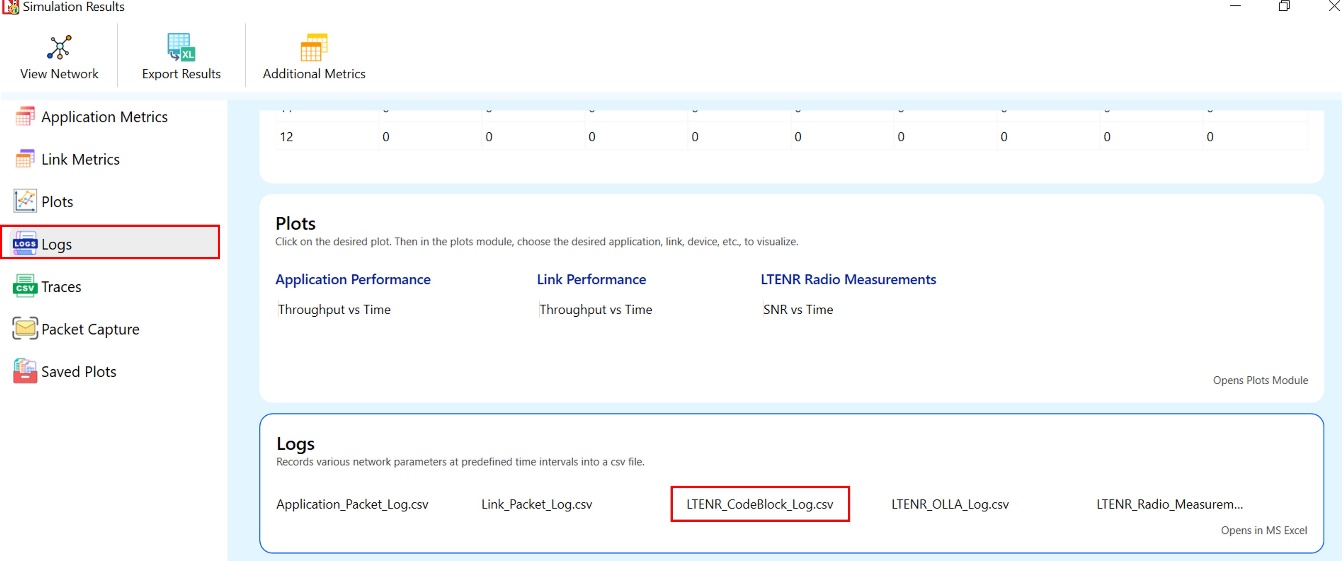
The log file can be accessed from the Simulations Results Window under the Logs drop down in the left pane.
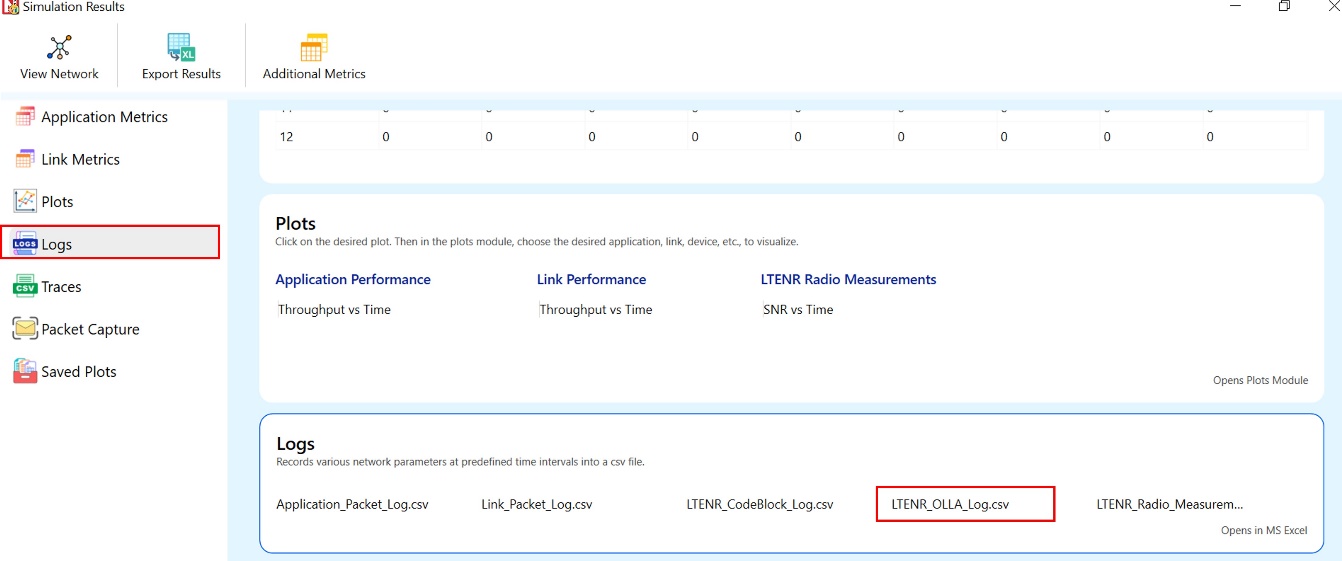
OLLA Log file
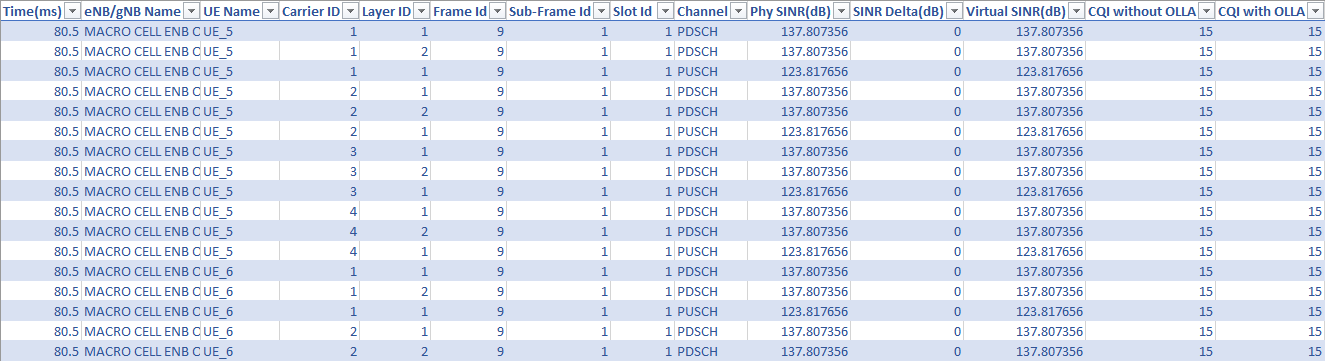
NetSim’s OLLA Log records parameters associated with Outer Loop Link Adaptation (OLLA) such as CQI with and without OLLA, PHY SINR, SINR Delta, Virtual SINR, etc. This log can be used to understand OLLA mechanisms in 5G.
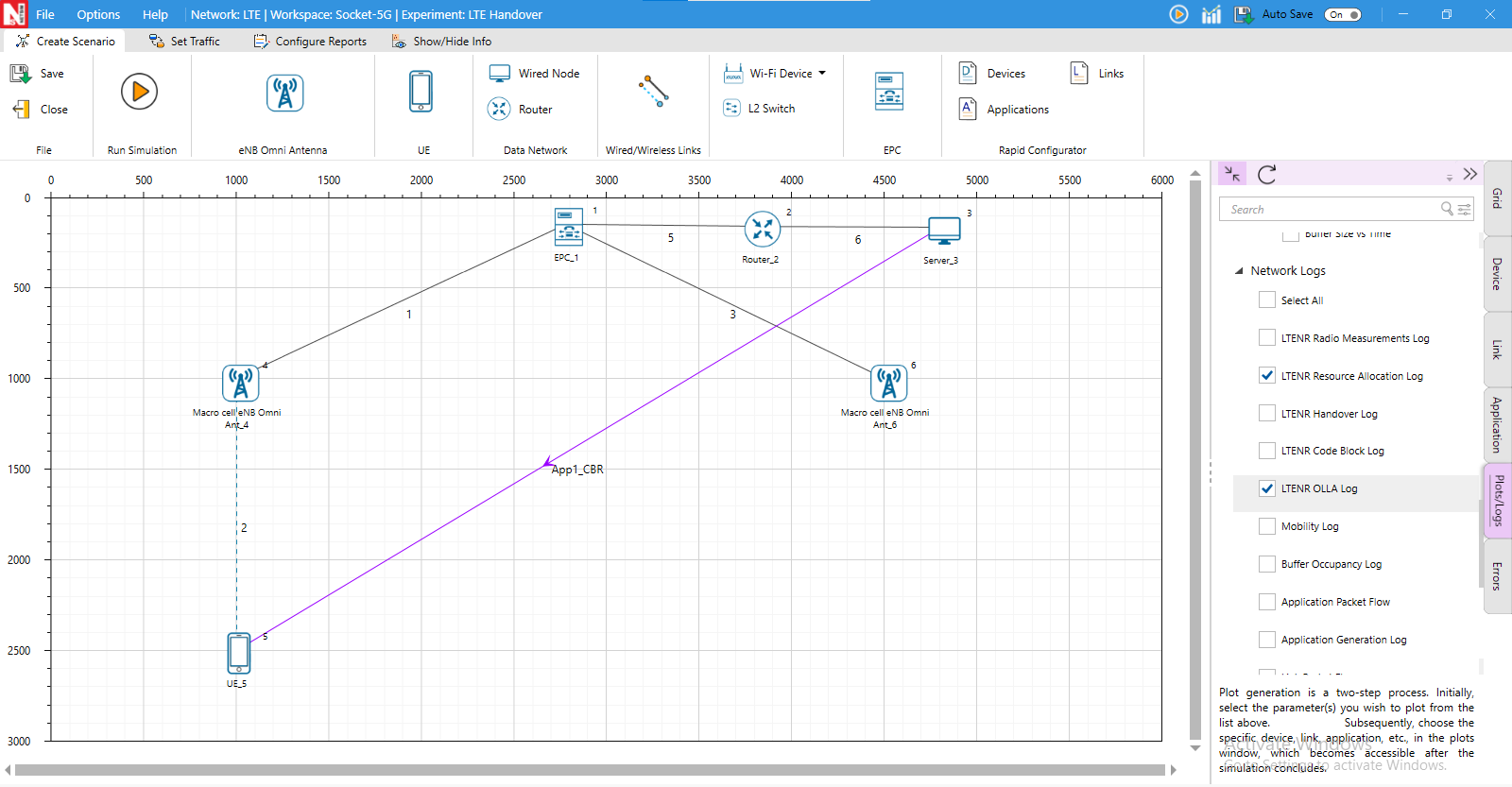
The LTENR OLLA log can be enabled by clicking on configure reports in top ribbon \(>\) Plots \(>\) Select OLLA log under Network Logs, as shown below.
The LTENR OLLA Log.csv file will contain the following information:
Time
eNB/gNB Name
UE Name
Carrier ID
Layer ID
Frame ID
Sub-Frame ID
Slot ID
Channel
Phy SINR in dB
SINR Delta in dB
Virtual SINR in dB
CQI without OLLA
CQI with OLLA
The log file can be accessed from the Simulations Results Window under the Logs drop down in the left pane.
Enable detailed logs in LTENR
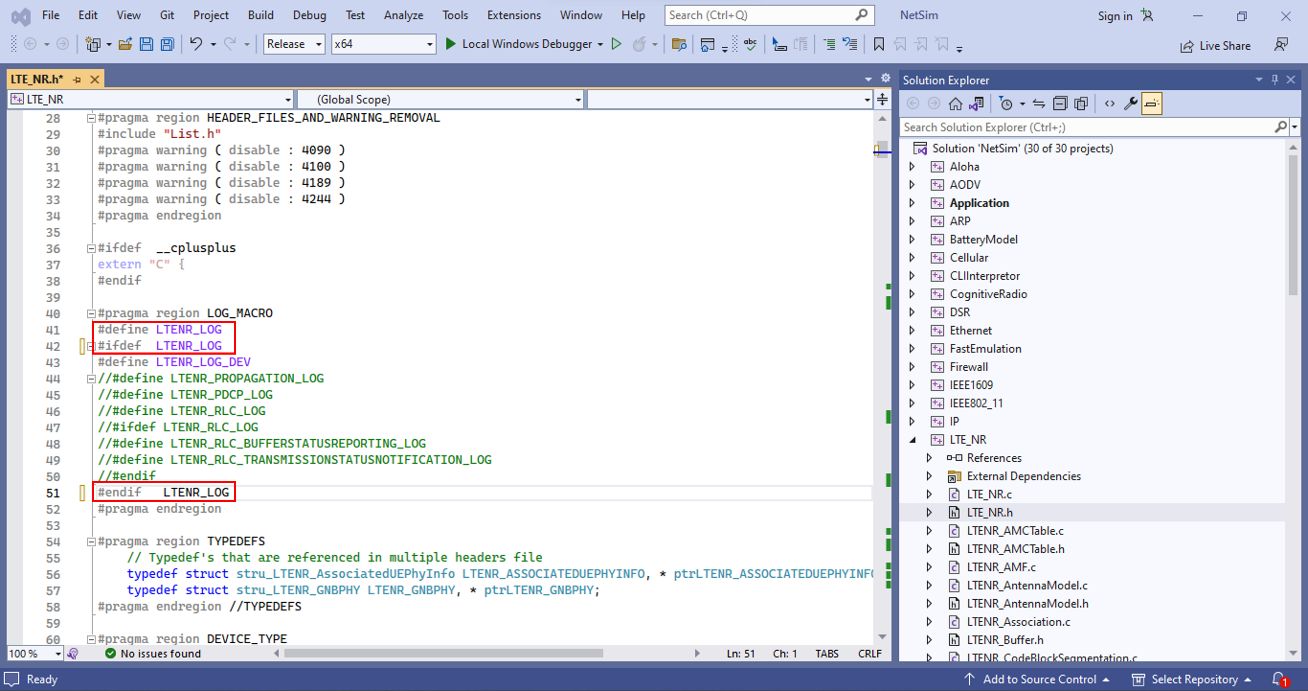
A detailed 4G NR log can be enabled by a user, by going to the file
LTE_NR.h, and then uncommenting the #define LTENR_LOG and
#define LTENR_LOG_DEV.
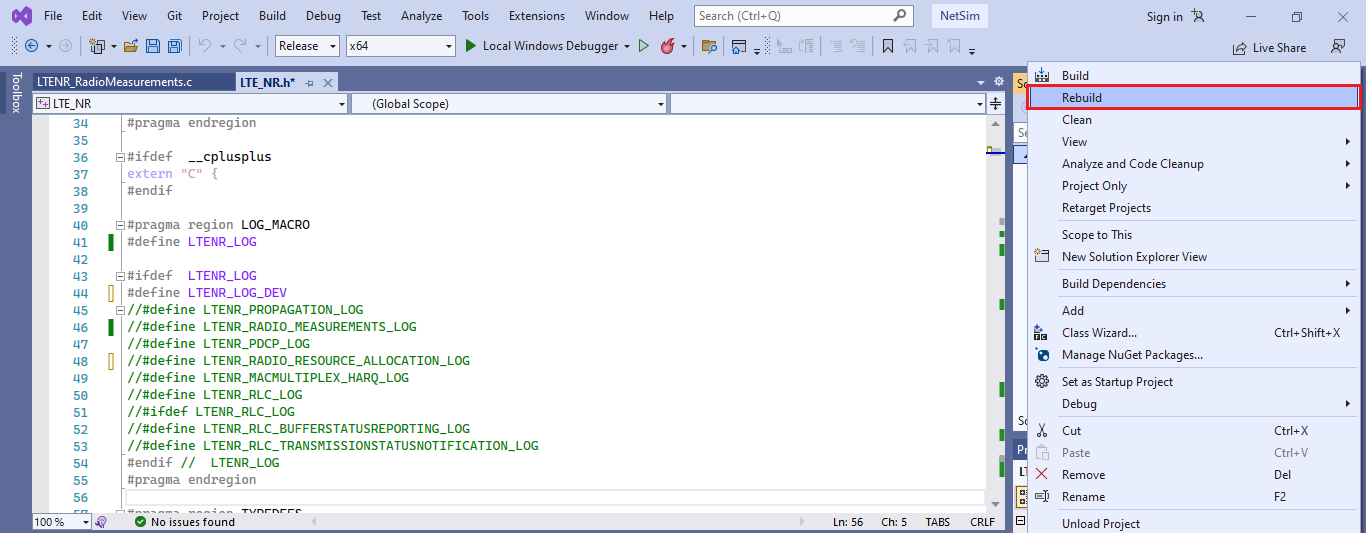
Then rebuild the code and run the simulation.
The log file will be available under Log Files menu in the left panel of the Results Window.
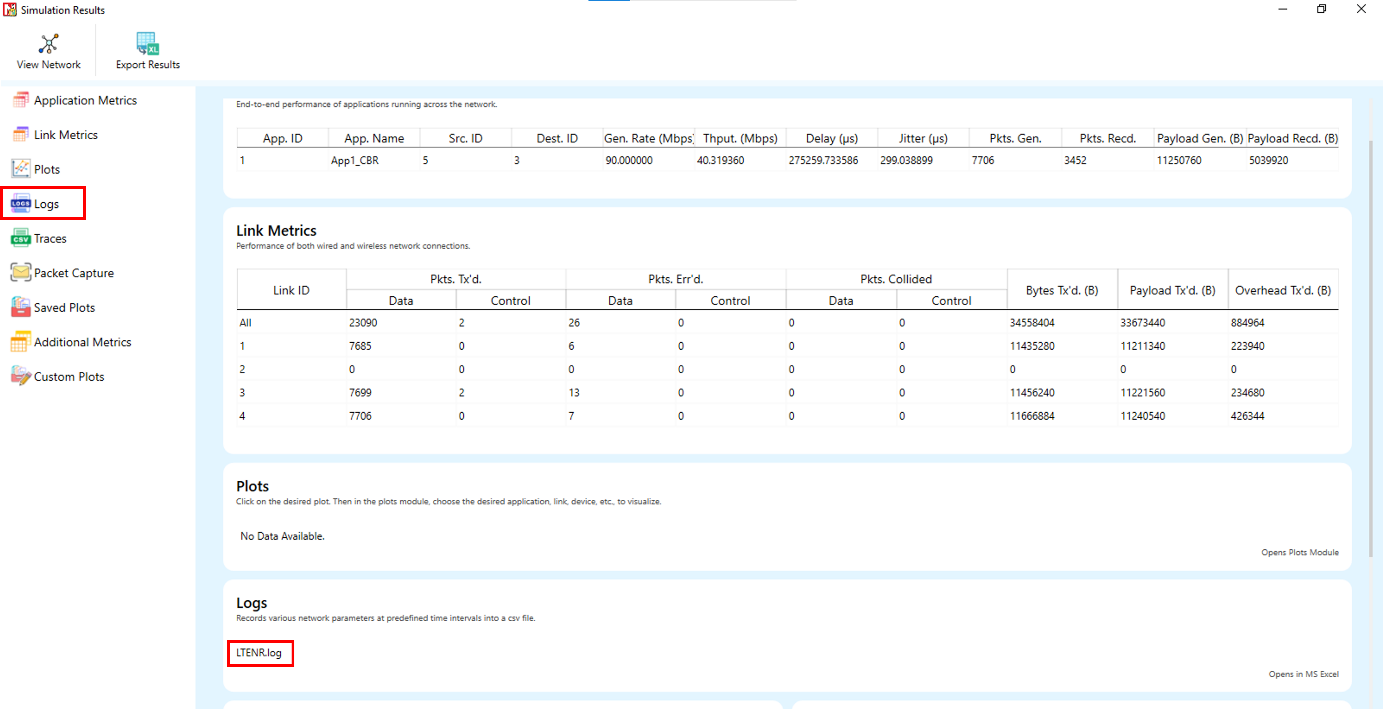
Among the various values noted in the log file are the CQI and MCS information. For example, a user may see the following log file:
CQI Table
15 256QAM 948 7.406300
MCS Table
27 256QAM 8 948.000000 7.406300
The CQI information is according to the 38-214 Table 5.2.2.1-2, 5.2.2.1-3, 5.2.2.1-4. And in the above example:
CQI Index: 15
Modulation: 256QAM
Code Rate \(\times\) [1024]: 948
Efficiency: 7.406300
The MCS information is according to the 38-214 Table 5.1.3.1-1, 5.1.3.1-2, 5.1.3.1-3. And in the above example:
MCS Index: 27
Modulation: 256QAM
Modulation Order: 8
Target code Rate \(\times\) [1024]: 948.000000
Spectral efficiency: 7.406300