Featured Examples
Sample configuration files for all networks are available in Examples Menu in NetSim Home Screen. These files provide examples on how NetSim can be used – the parameters that can be changed and the typical effect it has on performance.
NOTE: In all VANET featured examples, the error model is set to SINR BER by Formula.
Importing a simple VANET scenario from SUMO
Open NetSim and Select Examples > VANETs > Importing a simple VANET scenario from SUMO then click on the tile in the middle panel to load the example as shown in below screenshot.

This scenario involves a simple road traffic network scenario as shown below:

An equivalent network is created in NetSim by importing the SUMO configuration file. In NetSim the TCP/IP stack parameters of the devices are configured along with network traffic between vehicles.

The properties of Application, vehicle and link are set as follows:
| Properties | Properties |
|---|---|
| Application Type | BSM |
| Application Method | UNICAST |
| Packet Size | 20 (Bytes) |
| Inter Arrival Time | 1000000 (\(\mu\)s) |
| Link Properties | |
| Channel Characteristics | No Pathloss |
| Physical Layer Properties (Vehicle) | |
| Standard | IEEE802.11p |
| Transmitter Power | 40 mW |
| Antenna Gain | 1 dBi |
| Antenna Height | 1 m |
| Bandwidth | 10 MHz |
Note that the packet trace is enabled under the Configure Reports tab, and the mobility log is enabled under the Network Logs present in the plots on the right side. This allows for the recording of data traffic flow and vehicular movement.
After running the simulation, Packet Trace can be used to visualize packet flow along with packet information and Mobility log can be used to record vehicle mobility.

Simulation results dashboard provides the performance metrics of protocols running in different layers of the network stack of the devices.

V2V and V2I communication involving Vehicles and RSUs
Open NetSim and Select Examples > VANETs > V2V and V2I communication involving Vehicles and RSUs then click on the tile in the middle panel to load the example as shown in below screenshot.

NetSim VANETs module supports V2V and V2I communication. RSUs are now part of the GUI environment and can be dropped in addition to importing Vehicles from a SUMO configuration. Traffic can be configured between vehicles (V2V) and between vehicles and RSUs (V2I).
This scenario involves a simple road traffic network scenario as shown below:

An equivalent network is created in NetSim by importing the SUMO configuration file as shown below:

After importing the SUMO configuration file in NetSim, RSUs were added at junctions. In NetSim the TCP/IP stack parameters of the devices are configured along with network traffic between vehicles and between vehicles and RSUs.
Settings done for the Experiment:
| Properties | Properties |
|---|---|
| App Type | CBR |
| Application Method | BROADCAST |
| Transport Protocol | UDP |
| Packet Size | 1460 (Bytes) |
| Inter Arrival Time | 1000000 (\(\mu\)s) |
| Application-2 and 3 Properties | |
| App Type | BSM |
| Application Method | UNICAST |
| Packet Size | 20 (Bytes) |
| Inter Arrival Time | 1000000 (\(\mu\)s) |
| Link Properties | |
| Channel Characteristics | No Pathloss |
| Physical Layer Properties (Vehicles & RSU) | |
| Standard | IEEE802.11p |
| Transmitter Power | 40 mW |
| Antenna Gain | 1 dBi |
| Antenna Height | 1 m |
| Bandwidth | 10 MHz |
Note that the packet trace is enabled under the Configure Reports tab, and the mobility log is enabled under the Network Logs present in the plots on the right side. This allows for the recording of data traffic flow and vehicular movement.
After running the simulation, Packet Trace can be used to visualize packet flow along with packet information and mobility log can be used to record vehicle mobility.

Simulation results dashboard provides the performance metrics of protocols running in different layers of the network stack of the devices.

Throughput, delay and collisions with SCH and CCH time division
All the following examples are available in NetSim GUI. Navigate to Example > VANETs > Throughput, delay and collisions with SCH and CCH time division. Within Throughput, delay and collisions with SCH and CCH time division users will see four folders. Each folder comprises simulation samples for Parts 1, 2, 3 and 4 as explained below.
Background
Dedicated short range communication (DSRC) which uses two channels: Service channel SCH and Control channel (CCH). Each synchronization interval SI is split as follows:

All devices switch between SCH and CCH and the alternation is based on the time divisions. NetSim allows the user to configure values of CCH interval, SCH interval and Guard interval. The default channels used in NetSim are SCH 171 (5.855 GHz) and CCH 178 (5.890 GHz).
Multiple nodes access the medium using 802.11p protocol. IEEE 802.11p PHY operates in the 5.9 GHz band with a channel bandwidth of 10 MHz. 802.11p is an adaptation of the IEEE 802.11a standard used in Wi-Fi systems.
Simulation scenario

The scenario comprises four vehicles, V1, V2, V3 and V4 communicating to the RSU, R1 and to one another. Each vehicle sends unicast CBR traffic to the RSU and broadcasts BSM (safety messages) to one another. Recall that per DSRC functioning, BSM is sent on the CCH while CBR is sent on the SCH.
Simulation parameters and results
Part 1: Throughput
Open NetSim and Select Examples > VANETs > Throughput, delay and collisions with SCH and CCH time division > Throughput then click on the tile in the middle panel to load the example as shown in below figure.

The following network diagram illustrates what the NetSim UI displays when you open the example configuration file throughput as shown in below figure.

Settings done for the Experiment:
| Properties | Properties |
|---|---|
| Application Type | BSM (Applications 1–4) |
| Application Method | Broadcast |
| Packet Size | 20 (Bytes) |
| Inter Arrival Time | 320 (\(\mu\)s) |
| Application Type | CBR (Applications 5–8) |
| Application Method | Unicast |
| Packet Size | 1460 (Bytes) |
| Inter Arrival Time | 6147.4 (\(\mu\)s) |
| Link Properties | |
| Channel Characteristics | Pathloss Only |
| Pathloss Model | Log distance |
| Pathloss Exponent | 2 |
| Datalink Properties | |
| CCH Time | 20 ms, 25 ms, 30 ms, 50 ms (Varying) |
| SCH Time | 80 ms, 75 ms, 70 ms, 50 ms (Varying) |
| Physical Layer Properties (Vehicle) | |
| Standard | IEEE802.11p |
| Transmitter Power | 100 mW |
| Antenna Gain | 1 dBi |
| Antenna Height | 1 m |
| Bandwidth | 10 MHz |
Note that the packet trace is enabled under the Configure Reports tab, and the mobility log is enabled under the Network Logs present in the plots on the right side. This allows for the recording of data traffic flow and vehicular movement.
Results
The BSM application is configured with packet size of 20B and inter-packet arrival time of 320 \(\mu s\), while the CBR application is configured with packet size of 1460B and inter-packet arrival time of 5840 \(\mu s\).
| App | App Type | Gen. Rate (Mbps) | CCH 20ms SCH 80ms | CCH 25ms SCH 75ms | CCH 30ms SCH 70ms | CCH 50ms SCH 50ms |
|---|---|---|---|---|---|---|
| Throughput (Mbps) | ||||||
| BSM 1 | Broadcast | 0.5 | 0.096 | 0.122 | 0.144 | 0.241 |
| BSM 2 | Broadcast | 0.5 | 0.103 | 0.129 | 0.156 | 0.261 |
| BSM 3 | Broadcast | 0.5 | 0.109 | 0.135 | 0.163 | 0.274 |
| BSM 4 | Broadcast | 0.5 | 0.113 | 0.141 | 0.171 | 0.285 |
| Sum Throughput (Mbps) | 0.421 | 0.527 | 0.634 | 1.061 | ||
| Sum Throughput \(\times\) (SCH+CCH)/CCH | 2.106 | 2.107 | 2.114 | 2.123 | ||
| CBR 1 | Unicast | 1.9 | 1.826 | 1.726 | 1.544 | 1.139 |
| CBR 2 | Unicast | 1.9 | 1.778 | 1.691 | 1.604 | 1.190 |
| CBR 3 | Unicast | 1.9 | 1.837 | 1.668 | 1.622 | 1.119 |
| CBR 4 | Unicast | 1.9 | 1.884 | 1.762 | 1.619 | 1.087 |
| Sum Throughput (Mbps) | 7.328 | 6.849 | 6.391 | 4.537 | ||
| Sum Throughput \(\times\) (SCH+CCH)/SCH | 9.160 | 9.132 | 9.130 | 9.075 | ||
Observations
BSM is sent on CCH; CBR is sent on SCH. Increasing the fraction of time for CCH increases BSM throughput. Increasing the fraction of time for SCH increases CBR throughput.
As expected, Sum throughput divided by SCH fraction is equal for all cases. Similarly, Sum throughput divided by CCH fraction is equal in all cases. This verifies the working of time division between CCH and SCH.
Part 2: Delay
Open NetSim and Select Examples > VANETs > Throughput, delay and collisions with SCH and CCH time division > Delay then click on the tile in the middle panel to load the example as shown in below screenshot.

The following network diagram illustrates what the NetSim UI displays when you open the example configuration file as shown in below figure.

Settings done for the Experiment:
| Properties | Properties |
|---|---|
| Application Type | BSM (Applications 1–4) |
| Application Method | BROADCAST |
| Transport Protocol | WSMP |
| Packet Size | 20 (Bytes) |
| Inter Arrival Time | 6400 (\(\mu\)s) |
| Application Type | CBR (Applications 5–8) |
| Application Method | UNICAST |
| Transport Protocol | UDP |
| Packet Size | 1460 (Bytes) |
| Inter Arrival Time | 11680 (\(\mu\)s) |
| Link Properties | |
| Channel Characteristics | Pathloss Only |
| Pathloss Model | Log Distance |
| Pathloss Exponent | 2.5 |
| Data Link Properties | |
| CCH Time | 20 ms, 25 ms, 30 ms, 50 ms (Varying) |
| SCH Time | 80 ms, 75 ms, 70 ms, 50 ms (Varying) |
| Physical Layer Properties (Vehicle) | |
| Standard | IEEE802.11p |
| Transmitter Power | 100 mW |
| Antenna Gain | 1 dBi |
| Antenna Height | 1 m |
| Bandwidth | 10 MHz |
Note that the packet trace is enabled under the Configure Reports tab, and the mobility log is enabled under the Network Logs present in the plots on the right side. This allows for the recording of data traffic flow and vehicular movement.
Results
When analyzing delay, we change the generation rate such that it is below the saturation capacity of the network. If this were not so, then queuing delay would blow-up at (and post) saturation.
| App | App Type | Gen. Rate (Mbps) | CCH 20ms SCH 80ms | CCH 25ms SCH 75ms | CCH 30ms SCH 70ms | CCH 50ms SCH 50ms |
|---|---|---|---|---|---|---|
| Delay (Micro sec) | ||||||
| BSM 1 | Broadcast | 0.025 | 38298.82002 | 33567.59002 | 29364.14199 | 15288.49474 |
| BSM 2 | Broadcast | 0.025 | 41113.5348 | 34376.05357 | 29509.69213 | 15465.28051 |
| BSM 3 | Broadcast | 0.025 | 43021.08925 | 34569.64036 | 29879.04223 | 15326.54219 |
| BSM 4 | Broadcast | 0.025 | 38675.9637 | 34123.20029 | 30135.26103 | 15669.02365 |
| Average Delay | 40277.35 | 34159.12 | 29722.03 | 15437.33 | ||
| CBR 1 | Unicast | 1 | 9911877.311 | 10231477.86 | 46601863.3 | 46930314.68 |
| CBR 2 | Unicast | 1 | 24811785.51 | 26206924.26 | 31849109.01 | 11474867.33 |
| CBR 3 | Unicast | 1 | 4244775.494 | 4518140.717 | 10246485.37 | 35513878.28 |
| CBR 4 | Unicast | 1 | 47748603.46 | 48624907.15 | 3994697.125 | 4828944.515 |
| Average Delay | 21679260.45 | 22395362.5 | 23173038.7 | 24687001.2 | ||
Observations
CCH Delay has 3 components (a) waiting time where the packet is waiting for the SCH to complete (b) Medium access time and (c) Transmission time.
The mathematical analysis of delay is complex. It involves evaluating two difficult components (i) CCH packet waiting time while SCH packet is served and vice versa, and (ii) medium access time. We leave the mathematical analysis to interested researchers, and restrict ourselves to stating that the trends are as expected i.e., increasing CCH time (and reducing SCH time) reduces the CCH delay (and increases SCH delay).
Part 3: Collision count with increasing generation rate
Open NetSim and Select Examples > VANETs > Throughput, delay and collisions with SCH and CCH time division > Collision count with increasing generation rate then click on the tile in the middle panel to load the example as shown in below screenshot.
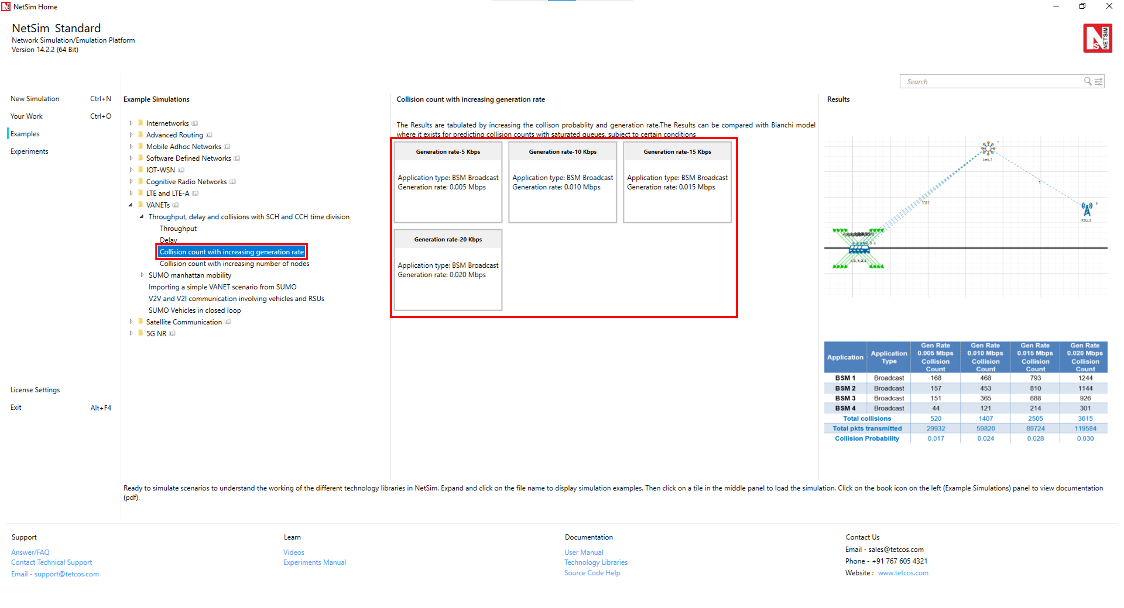
The following network diagram illustrates what the NetSim UI displays when you open the example configuration file as shown in below figure.


Settings done for the Experiment:
| Properties | Properties |
|---|---|
| App Type | BSM |
| Application Method | Broadcast |
| Packet Size | 20 (Bytes) |
| Inter Arrival Time | 32000 (\(\mu\)s), 16000 (\(\mu\)s), 10666.67 (\(\mu\)s), 8000 (\(\mu\)s) (Varying) |
| Link Properties | |
| Channel Characteristics | No pathloss |
| Datalink Properties | |
| CCH Time | 20 ms |
| SCH Time | 80 ms |
| Physical Layer Properties (Vehicle) | |
| Standard | IEEE802.11p |
| Transmitter Power | 100 mW |
| Antenna Gain | 1 dBi |
| Antenna Height | 1 m |
| Bandwidth | 10 MHz |
Note that the packet trace is enabled under the Configure Reports tab, and the mobility log is enabled under the Network Logs present in the plots on the right side. This allows for the recording of data traffic flow and vehicular movement.
Results
The application generation rates are mentioned in Row 1 (shaded grey).
| App | App Type | Gen Rate 0.005 Mbps | Gen Rate 0.010 Mbps | Gen Rate 0.015 Mbps | Gen Rate 0.020 Mbps |
|---|---|---|---|---|---|
| Collision Count | Collision Count | Collision Count | Collision Count | ||
| BSM 1 | Broadcast | 168 | 468 | 793 | 1244 |
| BSM 2 | Broadcast | 157 | 453 | 810 | 1144 |
| BSM 3 | Broadcast | 151 | 365 | 688 | 926 |
| BSM 4 | Broadcast | 44 | 121 | 214 | 301 |
| Total collisions | 520 | 1407 | 2505 | 3615 | |
| Total pkts transmitted | 29932 | 59820 | 89724 | 119584 | |
| Collision Probability | 0.017 | 0.024 | 0.028 | 0.030 | |
The Collision probability is the ratio between Collision count to total number of packets transmitted:
\[\text{Collision probability} = \frac{\text{Collision count}}{\text{packets transmitted}}\]
To find the Collision count of each individual application:
Click on Packet trace under traces present in the results dashboard window (Please make sure the packet trace is enabled before running the simulation)

Total no of collision counts, and packets transmitted can be viewed in the link metrics table over results dashboard.
In packet trace, filter the control packet type / App Name to App1_BSM to find the individual collision count.
Along with that filter the packet status field to collisions to view the collisions of that application (APP1 BSM).


After applying the filters, the total collision count of APP1 BSM applications can be viewed.

Same process can be done for all the remaining applications of the network.
Observations
Saturation throughput is about 0.25 Mbps per app or 1 Mbps total. Note the generation rate is below the saturation capacity of the network.
We see collision probability increases as generation rate increases.
To the best of our knowledge the mathematical modelling of collisions with non-saturated queues is an open problem. The Bianchi model exists for predicting collision counts with saturated queues, subject to certain conditions.
Part 4: Collisions count with increasing number of nodes
Open NetSim and Select Examples > VANETs > Throughput, delay and collisions with SCH and CCH time division > Collisions count with increasing number of nodes then click on the tile in the middle panel to load the example as shown in below screenshot.

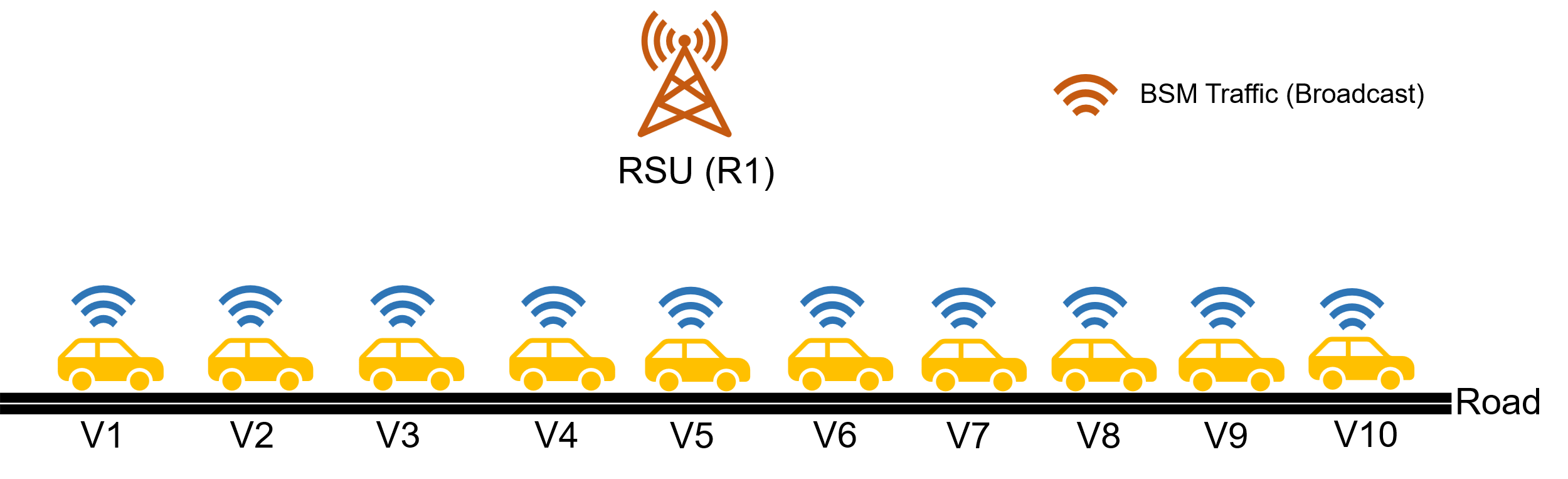
The following network diagram illustrates what the NetSim UI displays when you open the example configuration file as shown in below figure.

This scenario has 10 vehicles in a line on a road. The vehicles transmit power \(P_t = 20\) dBm, Carrier sense threshold \(CS_{th} = -85\) dBm, and we assumed log distance pathloss with \(\eta = 2.5\). The received power between nodes with maximum separation, \(d = 100\), is:
\[P_r = 20 - 47.88 - 10 \times 2.5 \times \log(100) = -77.88 \text{ dBm}\]
Based on the formula:
\[Rx_{\text{Power}} = Tx_{\text{Power}} + G_t + G_R - PL_{d0} - 10 \log(D^{\eta})\]
For detailed understanding of the receive power calculations refer to Propagation model:
https://tetcos.com/downloads/v14.1/Propagation-Models.pdf
Since \(P_r > CS_{th}\) all nodes can hear one another which means that they are all within CS Range.
Settings done for the Experiment:
| Properties | Properties |
|---|---|
| App Type | BSM |
| Application Method | BROADCAST |
| Packet Size | 20 (Bytes) |
| Inter Arrival Time | 320 (\(\mu\)s) |
| Link Properties | |
| Channel Characteristics | No Pathloss |
| Data Link Properties | |
| CCH Time | 20 ms |
| SCH Time | 80 ms |
| Physical Layer Properties (Vehicle) | |
| Standard | IEEE802.11p |
| Transmitter Power | 100 mW |
| Antenna Gain | 1 dBi |
| Antenna Height | 1 m |
| Bandwidth | 10 MHz |
Note that the packet trace is enabled under the Configure Reports tab, and the mobility log is enabled under the Network Logs present in the plots on the right side. This allows for the recording of data traffic flow and vehicular movement.
Results
| Number of Tx nodes | Collision Count | Pkts transmitted | Collision Probability |
|---|---|---|---|
| 0 | 31261 | 0.000 | |
| 2 | 0 | 75726 | 0.000 |
| 3 | 1731 | 127041 | 0.014 |
| 4 | 7142 | 187016 | 0.038 |
| 5 | 16724 | 252210 | 0.066 |
| 6 | 32045 | 325308 | 0.099 |
| 7 | 53946 | 405678 | 0.133 |
| 8 | 86203 | 499376 | 0.173 |
| 9 | 126970 | 596448 | 0.213 |
| 10 | 176435 | 704510 | 0.250 |
The total number of collision counts and packets transmitted can be viewed in link metrics window of results dashboard.


The Collision probability is the ratio between Collision count to total number of packets transmitted:
\[\text{Collision probability} = \frac{\text{Collision count}}{\text{packets transmitted}}\]
Observations
We see collision count increasing with number of transmitting nodes.
This can be compared against the Bianchi analytical model.
SUMO Manhattan Mobility with Single and Multi-hop Communication
Introduction
The Manhattan mobility in SUMO features a grid topology as shown below. It is composed of a number of horizontal and vertical streets. Each street has two lanes for each direction (North and South direction for vertical streets, East and West for horizontal streets). The mobile node is allowed to move along the grid of horizontal and vertical streets. At an intersection of a horizontal and a vertical street, the mobile node can turn left, right or go straight with certain probability.

Case 1: Manhattan mobility Single-hop RSU to vehicles
Objective
To create, using SUMO, a Manhattan Road network in which vehicles drive randomly, and to have a Roadside unit (RSU) which sends safety messages continuously to vehicles. The network performance is analyzed for different environments each having different RF channel characteristics.
Procedure
Open NetSim and Select Examples > VANETs > SUMO Manhattan mobility > Single hop communication then click on the tile in the middle panel to load the example as shown in below screenshot.

The NetSim UI would display as shown below.

Settings done for this sample experiment.
Configure CBR Applications (Broadcast application) set as below properties:
| App Method | App Type | App Name | Source ID | Destination ID | Pkt Size (B) | IAT (\(\mu\)s) |
|---|---|---|---|---|---|---|
| Broadcast | CBR | APP 1 CBR Broadcast | 21 | Broadcast to all 20 vehicles | 300 | 2,000,000 |
Transport protocol set as UDP in application Configuring window.
Click on ad hoc link/wireless link, expand the right-side property panel and set the properties as follows:
| Channel characteristics | Pathloss Model | Pathloss Exponent |
|---|---|---|
| Pathloss Only | Log distance | 2.5 |
Co-ordinates of RSU are set as X = 428.61, and Y = 108.06.
Set transmitter power to 1000mW under Interface 1(wireless) > Physical layer properties of vehicles and RSU.
The packet trace is enabled under configure reports tab and the mobility log is enabled under the network logs present in the plots on the right side, allowing the recording of data traffic flow and the vehicular movement.
Increase the pathloss exponent (in the order 2.5, 3, 3.5, 4) and note down the aggregate throughput and packets received for different application generation rates.
After running the simulation, Packet Trace can be used to visualize packet flow along with packet information and Mobility log can be used to record vehicle mobility. Time varying throughput plot can be opened from the Results window.

In SUMO GUI, you can see that vehicles choose random directions when they reach a junction in the Manhattan grid network.

Results and Observations
For sample RSU Broadcast Data Rate = 1.2 Kbps (Packet size = 300 bytes, IAT = 2,000,000\(\mu\)s. This means packets of size 300 Bytes are sent every 2 seconds).
| Environment | Path-loss Exponent | Packets Received (Aggregate) | Throughput (Kbps) (Aggregate) |
|---|---|---|---|
| Open Rural Area | 2.5 | 980 | 23.52 |
| Urban Area | 3 | 511 | 12.264 |
| Dense Urban Area | 3.5 | 209 | 5.016 |
| Very Dense Urban Area with Shadowing | 4 | 57 | 1.368 |
* Aggregate is the sum of the packet/throughputs obtained by all applications.
For sample RSU Broadcast Data Rate = 2.4 Kbps (Packet size = 300 Bytes, IAT = 1,000,000\(\mu\)s or 1 second. This means packets of size 300 Bytes are sent every second).
| Environment | Path-loss Exponent | Packets Received (Aggregate) | Throughput (Kbps) (Aggregate) |
|---|---|---|---|
| Open Rural Area | 2.5 | 1960 | 47.04 |
| Urban Area | 3 | 1022 | 24.528 |
| Dense Urban Area | 3.5 | 413 | 9.912 |
| Very Dense Urban Area with Shadowing | 4 | 114 | 2.736 |
For sample RSU Broadcast Data Rate = 9.6 Kbps (Packet size = 300 Bytes, IAT = 250,000\(\mu\)s or 0.25 seconds. This means four packets of size 300 Bytes are sent every 0.25 second).
| Environment | Path-loss Exponent | Packets Received (Aggregate) | Throughput (Kbps) (Aggregate) |
|---|---|---|---|
| Open Rural Area | 2.5 | 7920 | 190.08 |
| Urban Area | 3 | 4107 | 98.568 |
| Dense Urban Area | 3.5 | 1659 | 39.816 |
| Very Dense Urban Area with Shadowing | 4 | 461 | 11.064 |

Case 2: Manhattan mobility Multi-hop Vehicles to RSU
Objective
To create, using SUMO, a Manhattan Road network in which vehicles drive randomly, and to have a Roadside unit (RSU) to which vehicles continuously send unicast traffic via multi-hop (hopping via other vehicles if the RSU is beyond communication range). The network performance is analyzed for different vehicle counts.
Procedure
Open NetSim and Select Examples > VANETs > SUMO Manhattan mobility > Multi hop communication then click on the tile in the middle panel to load the example.

The NetSim UI would display as shown below.

Settings done for this sample experiment.
Configure CBR Application between the nodes as shown in the table and, click on application, expand the right-side property panel and set the application properties below.
| App Method | App Type | Source Id | Destination Id | Pkt Size (B) | IAT (\(\mu\)s) |
|---|---|---|---|---|---|
| Unicast | CBR | (All vehicles) | RSU | 1460 | 20,000 |
In Vehicle General Properties, under SUMO file Configuration.sumo.cfg file was selected from the Docs folder of NetSim Install Directory
<C:\Program Files\NetSim Standard\Docs\Sample-Configuration\VANET\SUMO-Manhattan-mobility-Single-hop-and-Multi-hop\Multi-hop-communication>

Transport protocol set as UDP in application Configuration window.
Click on Adhoc link / Wireless link and expand the right-side property panel and set Pathloss as No Pathloss.
RSU is dropped randomly as it is No Pathloss.
Click on the Vehicles and RSU and expand the right-side property panel and set Network layer routing protocol as DSR.
Set transmitter power to 1000mW under Interface 1(wireless) > Physical layer properties of Vehicles and RSU.
Mobility log is enabled under the network logs present in the plots on the right side, allowing the vehicular movement.
Run the simulation.
Increase the number of vehicles in the order 10, 20, 30 etc. and note down the aggregate throughput.
Result:
| Number of vehicles | Throughput (Kbps) (Aggregate)* |
|---|---|
| 1794.747 | |
| 20 | 1575.164 |
| 30 | 1675.729 |
| 40 | 2579.062 |
| 50 | 1923.464 |
*Aggregate is the sum of the packet/throughputs obtained by all applications.

SUMO Interfacing with vehicles moving in a closed loop
Open NetSim and Select Examples > VANETs > SUMO Vehicles in closed loop then click on the tile in the middle panel to load the example as shown in below figure.

The NetSim UI would display as shown below.

Settings done for this sample experiment:
Configure BSM (Basic Safety Message) Application between the nodes as shown in the table and, click on application, expand the right-side property panel and set the application properties below.
| APP_ID | Source ID | Destination ID | Packet Size (Bytes) | Inter-Arrival Time (\(\mu\)s) |
|---|---|---|---|---|
| APP_1_BSM | 1 | 6 (RSU) | 20 | 20,000 |
| APP_2_BSM | 2 | 6 (RSU) | 20 | 20,000 |
| APP_3_BSM | 3 | 6 (RSU) | 20 | 20,000 |
Transport protocol set as WSMP for all applications in application window.
In Vehicle Position properties, under SUMO file Configuration.sumo.cfg file was selected from the Docs folder of NetSim Install Directory
<C:\Program Files\NetSim Standard\Docs\Sample-Configuration\VANET\SUMO-Vehicles-moving-in-closed-loop>
Click on Adhoc link/Wireless link and expand the right-side property panel and set Pathloss as No pathloss.
RSU is dropped randomly as it is set to No pathloss.
Click on vehicles and RSU, then expand the right-side property panel. Go to Interface(wireless) > Datalink layer Properties and set DCF as the Medium Access Protocol.
Set transmitter power to 1000mW under Interface 1(wireless) > physical layer properties of vehicles and RSU.
Note that the packet trace is enabled under the Configure reports tab, and the mobility log is enabled under the Network Logs present in the plots on the right side. This allows for the recording of data traffic flow and vehicular movement and run simulation.
After running the simulation, Packet trace can be used to visualize packet flow along with packet information and mobility log can be used to record vehicle mobility. Time varying throughput plot can be opened from the Results window.
Result:

Same can be observed in SUMO as well:

According to SUMO, the road network consists of ‘Edges’ and ‘Junctions’. The re-router (a device in SUMO and is not to be confused with Routers available in NetSim) established in the edge will re-route the vehicle from one edge to another after one successful revolution through the road network. The presence of a single re-router will forward the vehicles from one edge to other and then the vehicle eventually stops its movement. Hence, two re-routers have been established in two edges which re-route the vehicle from one edge to other. The above road network consists of six edges in which re-routers are established in the starting and ending edges, which re-routes the vehicles present in the network from starting edge to the finishing edge after one complete revolution through the road or path. As a result, the vehicles will move through the closed loop continuously, until the end time configured in the configuration file.
The RSU configured in the network will allow V2I communication. Per the application configuration a 100 bytes packet is transmitted from vehicle to RSU every 2 seconds. This can also be observed in the packet trace.