Unmanned Aerial Vehicle (UAV) Communication
Framework for co-simulation of UAV flight dynamics and UAV-BS network communications and network performance analysis.
- The MATLAB UAV toolbox models the UAV flight dynamics.
- For each UE in NetSim, MATLAB creates a UAV with the same UE (UAV) ID.
- MATLAB calculates the flight path and passes this as a mobility file (x, y, z vs. time) to NetSim.
- NetSim moves the UE as the mobility file specifies.
- The pathloss model in NetSim follows TR 36.777 (Aerial Vehicles).
UAV Takes off and flies away

- UAV take off: Z axis varies from 0m to 750m
- Saturation (full buffer) traffic
- Simulation Time: 100s
- The plot shows the application throughput over the simulation time.
UAV flies in a holding pattern over the gNB

- UAV takes off and flies in a holding pattern around the gNB
- Saturation (full buffer) traffic
- Simulation Time: 100s
- The plot shows the application throughput over the simulation time.
Performance Analysis
NetSim Throughput Plot
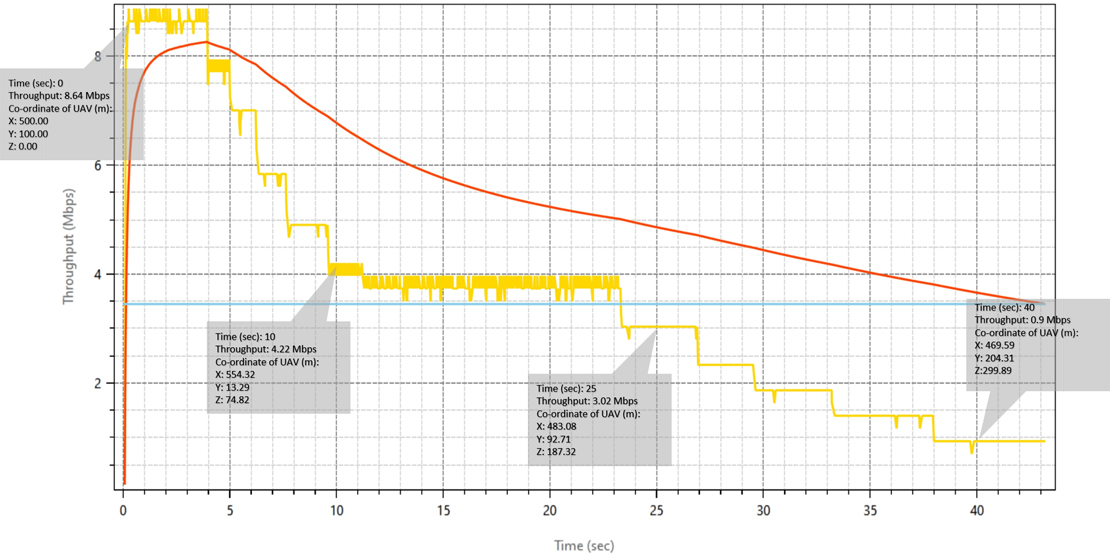
Case 1: Discussion
- The UAV is closest to the gNB at takeoff. The throughput is ~8 Mbps.
- As the UAV climbs and flies away, the throughput decreases to ~4 Mbps at about 10 s.
- The UAV loses the connection with the gNodeB at ~45 s.
NetSim Throughput Plot

Case 2: Discussion
- At take-off (nearest to the gNB), the UAV gets a throughput of ~15 Mbps.
- The throughput drops as the UAV flies away from the gNB.
- The throughput then varies periodically. It is highest at the two points where the flight path brings the UAV close to the gNB.
Reference:
Check out detailed documentation for the code and an explanation of the scenario.